4. Models
4.1 Introduction
The Physical Model reflects the actual configuration of physical assets in your plant - this represents all the equipment you can physically touch and manipulate in the real world, such as valves, pumps, tanks, and sensors. The Procedure Specification Model is developed to capture all the operating procedures your plant needs and documents the functional requirements for each procedure (what the procedure needs to accomplish and how it should behave).
When procedures are selected for automation, these specifications get converted into the Procedure Implementation Model following the workflow shown in Figure 1. This implementation model contains the actual code and logic that will run on your control system.
Note: “Agile” development practices should be allowed, meaning you can iterate between the design and implementation phases as needed - this flexibility helps address issues that come up during development rather than forcing a strict linear process.
Once a procedure is automated, it executes within a process control computer (typically a DCS or PLC system) rather than being performed manually by operators.
Industrial Example: A manual startup sequence documented in your specification model becomes automated code that the DCS executes to bring equipment online in the proper sequence.
Procedure implementation doesn’t require complete automation through computer control systems alone. Many procedures can include manual operator actions or require operators to verify specific process conditions, as outlined in section 4.10.4 on Degrees of Automation.
Note: This mixed approach (semi-automated control) is common in industrial settings where human oversight ensures safety and handles exceptions that automated systems might not anticipate. The operator remains an integral part of the control loop, performing tasks like visual inspections, manual valve operations, or confirming that process variables are within acceptable ranges before proceeding to the next step.
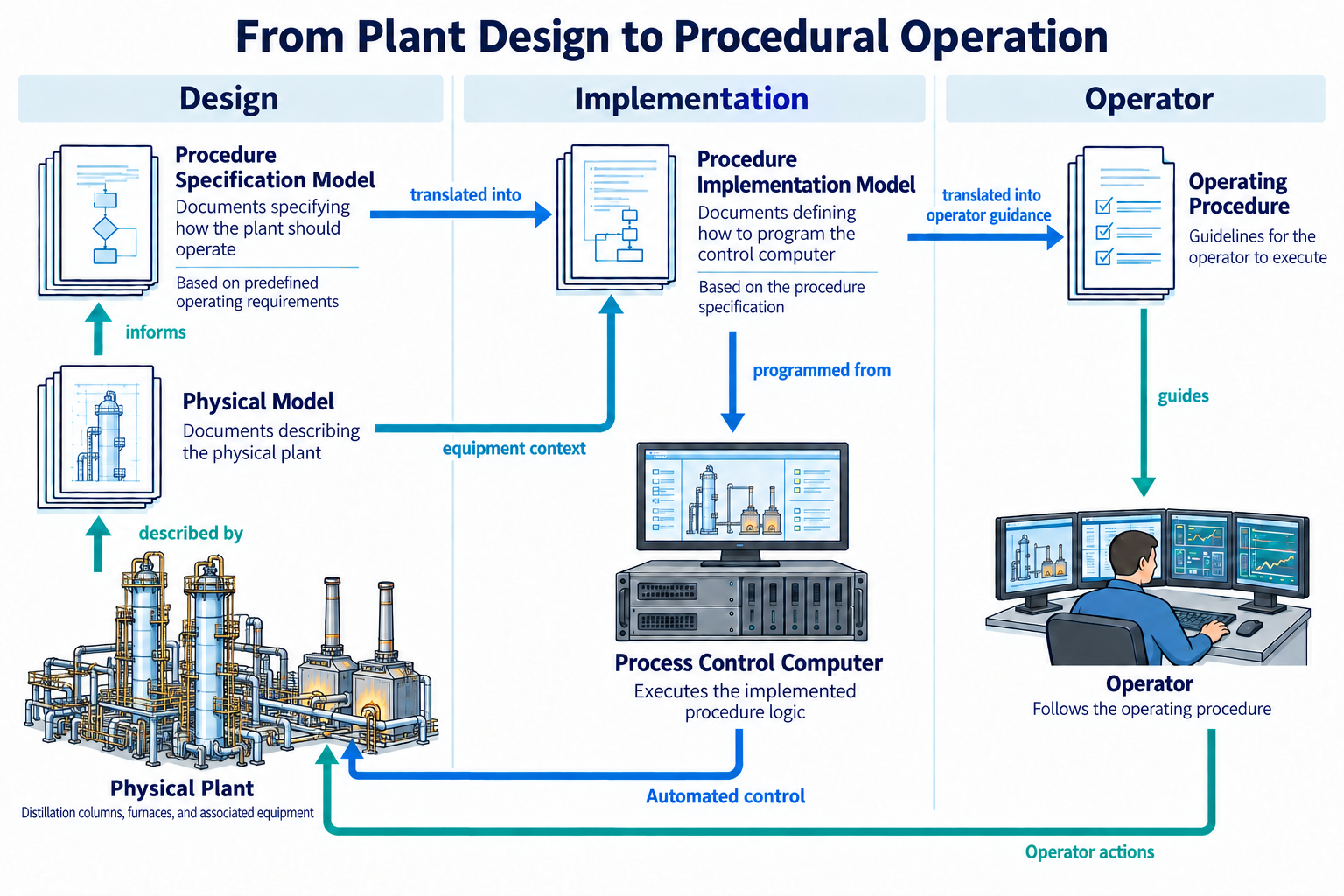
Figure 1 – Workflow of the Models
This diagram illustrates the sequential flow of mathematical models used in the control system design process. The workflow shows how each model builds upon the previous one, starting from the physical system representation and progressing through various stages of control development.
Note: Understanding this model hierarchy is crucial for systematic controller design, as each stage serves a specific purpose in translating real-world system behavior into implementable control algorithms.
The workflow typically begins with system identification (determining the mathematical relationship between inputs and outputs), moves through controller design phases, and concludes with validation models that verify performance before implementation. Each transition point represents where engineers make critical decisions about model fidelity versus computational complexity.
Industrial Example: In a temperature control application, you might start with a thermal dynamics model, develop a simplified transfer function for controller tuning, then use a detailed simulation model to test the complete control loop before deploying to the actual process.
Procedure automation of continuous process operations (like chemical plants, refineries, or water treatment facilities) is based upon these three models:
Note: In continuous processes, materials flow steadily through the system rather than being processed in discrete batches. The automation strategy depends on which of these three fundamental models best represents your process behavior and control requirements.
Industrial Example: A distillation column in a refinery operates as a continuous process where crude oil continuously enters and refined products continuously exit, requiring different automation approaches than a batch reactor that processes one load at a time.
Physical Model: The Physical Model shows how the ISA-95 Role-Based Equipment Model (a standardized framework for organizing manufacturing equipment into functional hierarchies) is implemented in continuous process operations. This model provides a structured way to represent equipment relationships and control responsibilities in processes that run continuously, such as chemical manufacturing, oil refining, or food processing.
Note: Unlike batch operations where equipment performs discrete steps, continuous processes require the model to account for steady-state operations and flowing materials between interconnected equipment units.
The Procedure Specification Model shows the relationship between procedure specifications (step-by-step operational instructions for equipment and processes) and the hierarchical structure defined in the Physical Model. This mapping ensures that each procedure is properly linked to the correct physical equipment level, from individual devices up through process units and entire production areas.
Note: This mapping is crucial for maintaining traceability between what the control system is instructed to do (procedures) and what physical equipment actually executes those instructions.
The Procedure Implementation Model serves as the critical interface that links the Procedure Specification Model (the high-level description of what the control system should do) with the Physical Model (the mathematical representation of the actual plant or process being controlled). This model essentially translates the abstract control requirements into implementable control actions that can be executed on real hardware.
Note: Think of this as the “bridge” that converts your control strategy documents into actual control logic that runs on PLCs, DCS systems, or other control hardware. It handles the practical aspects of how theoretical control algorithms get deployed in the field.
4.2 Definition: Model
A Model is a structured, conceptual representation of the process, control strategy, or automation structure used to organize and define how procedure automation is designed and understood.
In this document, a Model:
- Defines logical structure and relationships
- Represents how the plant, equipment, or procedures are organized
- Is independent of software implementation
- Serves as the architectural foundation for automation design
Typical examples in procedure automation:
- Physical Model — Represents plant → unit → equipment → control module hierarchy
- Procedural Model — Represents definition of procedure modules
- Implementation Model: Represents structure of procedure modules
👉 A model describes what exists and how it is structured.
4.3 Definition: Module
A Module is a functional implementation element that performs control, monitoring, or execution tasks within the automation system.
In this document, a Module:
- Is implemented in DCS or PLC software
- Executes specific control or procedural logic
- Operates at defined levels of the model
- Can be reused across different procedures
Typical examples:
- Control Module (CM) — Performs regulatory control, interlocks, and device logic
- Equipment Module (EM) — Groups control modules to represent a piece of equipment
- Unit Module (UM) — Groups control modules to represent a unit
👉 A module performs how the automation actually works.
4.4 Model vs Module — Key Differences
| Aspect | Model | Module |
|---|---|---|
| Nature | Conceptual / structural | Functional / executable |
| Purpose | Organizes and defines structure | Executes control or procedure logic |
| Level | Architecture / design | Software implementation |
| Dependency | Independent of vendor system | Implemented in DCS/PLC |
| Question Answered | What is the structure? | How is it executed? |
| Example | Physical Model hierarchy | Control Module in DCS |
4.5 Simple Engineering Analogy
- Model = Blueprint
- Module = The actual machine built from the blueprint
4.6 In Procedure Automation Context
The Model defines:
- How equipment is structured
- How procedures are organized
- How states relate
The Modules implement:
- Control logic
- Interlocks
- Phase logic
- State transitions
4.7 Requirement
The Procedure Owner (as defined in Table 10 – Description of Roles) shall ensure that procedure automation of continuous process operations is based upon these three models defined above.
Note: In continuous processes (like chemical reactors, distillation columns, or fluid flow systems), the control system needs to understand how the process behaves under different conditions. The three referenced models typically include steady-state behavior, dynamic response characteristics, and disturbance handling - all critical for designing reliable automated procedures.
4.8 Physical Model
The Physical Model shown in Figure 2 represents all the actual process equipment that can be automated within your control system’s scope. Think of this as a digital representation of your physical plant assets - pumps, valves, sensors, and other hardware components. The objects in this Physical Model represent only the physical equipment itself and do not include any control logic, PID loops, or automation algorithms that might be programmed to operate them.
Key Structure Rule: Physical Model levels can be combined to create higher-level groupings in the hierarchy (organizing equipment into logical groups like “Reactor Section” or “Distillation Unit”). Each hierarchical level can only contain groups from the level directly below it, with one important exception - equipment and device groupings have more flexibility.
Exception to the Rule: Equipment objects are allowed to contain other subordinate equipment (like a pump skid containing multiple pumps), and devices can contain other subordinate devices (like a smart transmitter containing multiple sensor elements). This nested structure helps represent complex equipment assemblies accurately.
Note: The individual grouping descriptions and the section on model collapsibility (the ability to expand or collapse hierarchical views) provide more detailed information on how these relationships work in practice.
4.8.1 Requirement
The Procedure Owner shall ensure that the Physical Model shown in Figure 2 represents the process equipment available within the scope of procedure automation implementation.
Note: This verification step is critical because any mismatch between the model and actual field equipment can lead to control logic errors, incorrect I/O mapping, or safety issues during commissioning.
4.8.2 Requirement
The Procedure Owner shall ensure that at least one physical level exists.
Definition: A physical level refers to the actual hardware layer in the control architecture, such as field devices (sensors, actuators, valves), PLCs, or HMI stations that interface directly with the physical process.
Note: This requirement ensures that the control procedure maintains connection to real-world equipment rather than existing only as software logic without hardware implementation.
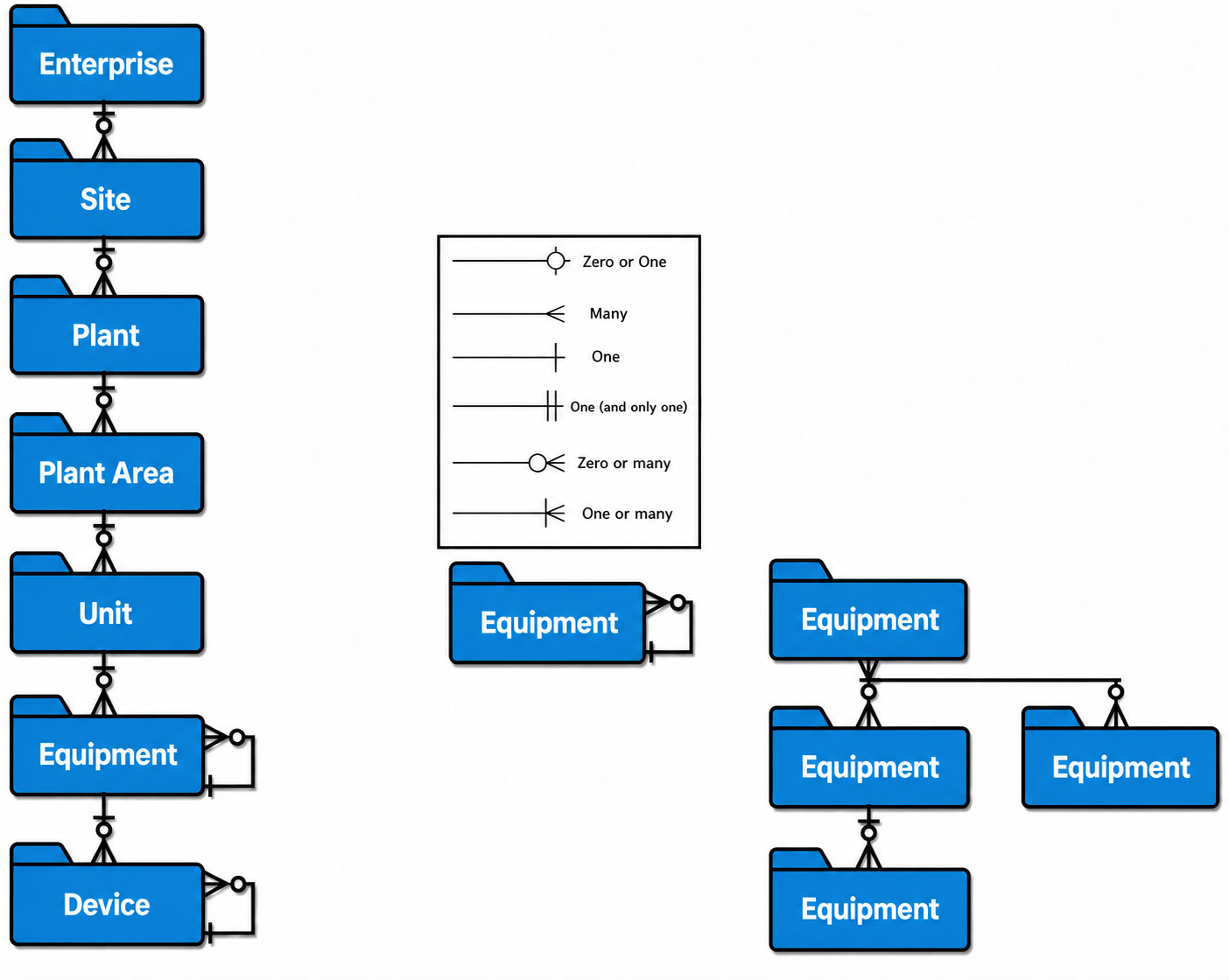
Figure 2 – Physical Model
This figure represents the mathematical representation of the actual physical system we’re controlling. A physical model captures the real-world dynamics of our plant (the equipment or process being controlled) using differential equations, transfer functions, or state-space representations.
Key Purpose: The physical model helps us understand how inputs (like control signals) affect outputs (like temperature, pressure, or position) in the actual system, including any delays, nonlinearities, or disturbances present in the real equipment.
Note: This model forms the foundation for controller design and simulation - the more accurate our physical model, the better our control system will perform when implemented on the actual hardware.
4.8.3 Enterprise
An Enterprise is a collection of one or more manufacturing sites or production plants that operates at the highest organizational level. The Enterprise is responsible for making strategic decisions about what products will be manufactured, which specific sites or plants will produce them, and establishing the general production methodologies and standards across all facilities.
Definition: Think of the Enterprise as the corporate headquarters that oversees all manufacturing operations - it sets the overall production strategy rather than handling day-to-day process control.
Industrial Example: A chemical company’s Enterprise level might decide to produce a new polymer grade, assign it to their Texas facility, and specify that it should use continuous reactor processes rather than batch operations.
From a control systems perspective, Enterprise-level decisions directly influence the automation requirements, control strategies, and process configurations that we implement at individual plant sites.
Example Corporate, Business Unit, and Division
When designing control systems for large organizations, understanding the corporate structure is essential for implementing proper network architecture and system hierarchy. The corporate level typically houses the main enterprise resource planning (ERP) systems and executive dashboards, while business units contain regional manufacturing operations with their own process control networks.
Industrial Example: A chemical company might have its corporate headquarters managing overall production targets and financial data, while individual divisions like “Specialty Chemicals” and “Basic Materials” operate their own distributed control systems (DCS) and supervisory control and data acquisition (SCADA) networks.
Each division usually maintains separate control networks for security and operational independence, though data integration between levels is crucial for enterprise-wide monitoring and optimization. The control engineer must consider communication protocols, network segmentation, and data flow requirements when connecting field devices up through the corporate information systems.
Note: Network security becomes increasingly important as you move up the organizational hierarchy, requiring careful consideration of firewalls and data encryption between operational technology (OT) and information technology (IT) systems.
4.8.4 Site
A Site is a physical, geographical, or logical grouping of plants determined by the enterprise. The boundaries of a Site are usually based on organizational or business criteria as opposed to technical criteria.
Definition: In this context, a “plant” refers to an individual manufacturing facility or production unit, not the botanical kind. Each plant typically contains multiple process units, equipment, and control systems that work together to produce a specific product or perform a particular function.
Industrial Example: A chemical company might define a Site as all manufacturing plants within a 50-mile radius of their main office, or group plants by product line (all polymer production facilities) regardless of their physical location. This grouping helps with business management, resource allocation, and reporting structures, even though the plants might have completely different control system architectures or communication protocols.
Note: Understanding Site boundaries is important for control engineers because it affects how data flows between systems, determines reporting hierarchies in your HMI/SCADA systems, and influences network security zones. The business-driven Site definition might not align perfectly with your control system network topology.
When implementing control systems, engineers typically encounter four main categories of operational environments, each with distinct characteristics and requirements.
Complex systems refer to multi-loop control architectures where multiple process variables interact with each other. These systems often require advanced control strategies like cascade control (where one controller’s output becomes another’s setpoint) or feedforward control to manage the interdependencies effectively.
Train operations involve sequential processing units or equipment that operate in series, where the output of one stage becomes the input for the next.
Industrial Example: In a chemical plant, raw materials might flow through reactor trains, distillation trains, and finishing trains, each requiring coordinated control to maintain overall process efficiency.
Facility-level control encompasses the broader infrastructure systems that support production operations. This includes utilities management (steam, compressed air, cooling water), safety systems, and building automation. These systems typically operate at a supervisory level above individual process loops.
Field-level control represents the distributed control elements located directly at or near the process equipment. This includes field-mounted transmitters, control valves, and local control panels that interface directly with the physical process.
Note: Understanding these categories helps in selecting appropriate control hardware, communication protocols, and system architecture for each application level. Modern distributed control systems (DCS) are designed to integrate all four levels seamlessly.
4.8.5 Plant
A Plant is the physical infrastructure consisting of buildings, facilities, and control systems that work together to execute industrial manufacturing processes. From a control engineering perspective, a Plant encompasses all the plant areas, equipment, and interconnected systems needed to transform raw materials into finished products or a specific product line.
Key Point: Plant boundaries are typically defined by business and organizational factors rather than technical system architecture. This means a single Plant might contain multiple independent control systems, or conversely, related control systems might be distributed across different Plants within the same company.
Industrial Example: A chemical processing Plant might include reactor vessels, distillation columns, pumps, heat exchangers, and their associated control loops - all housed within the same facility and managed as one operational unit, even though the control systems could technically be segmented differently.
The XYZ site consists of a polyethylene plant, a chlorine plant, and a polyvinyl chloride plant.
Note: This integrated chemical complex represents a typical downstream petrochemical operation where the chlorine plant produces chlorine gas as a feedstock, the polyethylene plant processes ethylene into plastic pellets, and the polyvinyl chloride (PVC) plant combines ethylene-derived vinyl chloride monomer with chlorine to produce PVC resin. Each plant will have distinct control requirements - chlorine handling requires specialized safety interlocks due to toxicity concerns, while polymer plants typically focus on temperature and pressure control for reaction optimization.
4.8.6 Plant Area
A plant may be divided into several plant areas. A Plant Area can be an accumulation of Units (individual process equipment or functional sections like reactors, distillation columns, or heat exchangers).
Note: This hierarchical structure helps organize control strategies - you might have unit-level controllers for individual equipment, with area-level coordination managing interactions between units, and plant-level optimization overseeing the entire facility.
Plant areas are distinct operational zones within an industrial facility, each serving a specific function in the overall process. For example, a chemical manufacturing plant might be divided into a reaction area (where raw materials undergo chemical transformation), a purification area (where impurities are removed from intermediate products), or a distillation area (where components are separated based on different boiling points).
Note: When designing control systems, each plant area typically requires its own set of instrumentation, control loops, and safety interlocks that are tailored to the specific process requirements and hazards of that particular zone.
4.8.7 Unit
A Unit is built around one main piece of process equipment and includes all the supporting equipment and devices needed to carry out a significant processing operation on a material stream (such as heating, separating, or mixing a product). Each Unit handles its processing tasks with relative independence, meaning it can largely control its own operations without constant oversight from other systems.
Note: While Units operate independently, they don’t work in isolation. Multiple Units within the same Area often coordinate and interact with each other to complete their processing activities effectively.
The flow between Units follows a logical sequence: a Unit typically receives material or product from an upstream unit (the previous step in the process), performs its designated transformation or processing operation, then transfers the modified product to downstream units (the next steps in the process chain).
Industrial Example: In a chemical plant, a distillation Unit might receive crude mixture from an upstream reactor Unit, separate it into different components, then send purified products to downstream storage or packaging Units.
Supporting equipment that doesn’t directly participate in the main production process includes Clean-In-Place (CIP) systems, steam generation, electrical distribution, and water treatment systems. These supporting systems are classified as utilities rather than process units because they don’t directly transform or handle the final product.
Classification Note: While utilities are still considered equipment in the plant hierarchy, they should be organized differently from production units. The recommended approach is to place utility equipment directly under the relevant plant area in your control system hierarchy, as demonstrated in Figure 7.
Definition: Utilities provide essential services (power, steam, cleaning, etc.) that enable production but don’t directly modify the product itself, unlike process units which directly handle or transform materials.
This classification approach helps maintain clear separation between production-critical equipment and supporting infrastructure when designing control strategies and alarm management systems.
A distillation unit encompasses the complete process system required for separation operations, including the main distillation tower (where vapor-liquid separation occurs), the reboiler (which provides heat at the bottom to generate vapor), the condenser (which removes heat at the top to condense vapor back to liquid), the recycle drum and associated pumps (for handling reflux and product streams), plus all supporting process equipment that enables the distillation function to operate effectively.
Note: From a control perspective, each of these components typically has its own control loops - temperature control for the reboiler and condenser, level control for the recycle drum, and flow control for the pumps - all working together as an integrated system.
A Process Unit is a grouping of equipment and devices used to carry out one of the following major processing activities such as reaction, compression, and distillation.
Industrial Example: In a chemical plant, a distillation column along with its reboiler, condenser, pumps, and associated instrumentation would constitute one process unit. Similarly, a reactor vessel with its heating/cooling systems, agitators, and control loops forms another distinct process unit.
Note: From a control perspective, each process unit typically has its own dedicated control strategies and may operate semi-independently, though they often interact through material and energy flows with other units in the overall process.
4.8.8 Equipment
Equipment in industrial processes consists of individual devices (like sensors, actuators, or transmitters), smaller equipment subsystems, or a combination of both. This equipment can either be integrated as part of a larger process unit or function as an independent equipment group within a specific plant area. Each piece of equipment is designed to perform a defined set of processing functions.
Definition: A process unit refers to a collection of equipment that works together to complete a major processing step, such as a distillation column system or a reactor assembly.
Industrial Example: A pump station might include the pump itself (main equipment), along with flow transmitters, pressure sensors, and control valves (devices), all working together to move fluid through the process while maintaining proper flow control.
Example 1: Pumping, heating, and filtering are specific processing activities that represent individual unit operations within a larger control system.
Definition: Unit operations are distinct physical or chemical processes that can be controlled independently, each typically requiring their own control loops with sensors, controllers, and final control elements.
Industrial Example: In a water treatment plant, the pumping stage controls flow rate using a VFD (variable frequency drive), the heating stage maintains temperature through a PID controller managing steam valves, and the filtering stage monitors differential pressure across filter media to trigger backwash cycles.
Example 2: Filters and pump sets are pieces of process equipment that the equipment section might focus on.
Definition: Process equipment refers to the physical components in a manufacturing or process plant that perform specific operations on materials or fluids.
Industrial Example: In a water treatment facility, filters remove contaminants from incoming water while pump sets (coordinated groups of pumps working together) move the filtered water through different treatment stages. As a control engineer, you’ll typically work with the instrumentation and control systems that monitor filter pressure differential, pump speed, flow rates, and coordinate their operation rather than the mechanical equipment itself.
Note: The “equipment section” typically refers to the part of your process documentation or P&ID (Piping and Instrumentation Diagram) that catalogs major mechanical equipment, as opposed to sections covering instrumentation, piping, or electrical systems.
4.8.9 Device
A Device is a sensor, actuator, or other control element that forms part of your control system. These devices can include regulatory control (like PID controllers that maintain setpoints), device control (internal control loops within the device itself), or logic control capabilities. However, this control logic comes pre-programmed by the device manufacturer and cannot be modified by the user - you can only adjust parameters such as setpoints, gain values, or operating limits.
Note: Think of a smart valve positioner or a variable frequency drive (VFD) - these have built-in control algorithms that you configure through parameters, but you cannot change the underlying control logic itself.
Example 1: Valve positioners, valve actuators, valve limit switches, single variable transmitters, and motor starters are all classified as field devices (physical components installed in the process that interface directly with the control system).
Note: These devices form the foundation of most control loops - positioners control valve position based on control signals, actuators provide the physical force to move valves, limit switches provide discrete feedback on valve position, transmitters convert process variables like pressure or temperature into standardized signals (typically 4-20 mA), and motor starters control the operation of electric motors in the field.
A self-contained mass flow controller (MFC) incorporates its own regulatory control loop within the device. This means the MFC has an integrated controller that automatically maintains the desired flow setpoint without requiring an external PID controller or control system.
Definition: Regulatory control refers to basic feedback control that maintains a process variable (in this case, mass flow rate) at a desired setpoint by automatically adjusting the manipulated variable (typically a control valve position).
Note: Since the control loop is self-contained, you only need to provide the flow setpoint to the MFC - it handles the sensing, control calculations, and valve actuation internally. This simplifies system integration compared to using separate flow sensors, controllers, and control valves.
4.9 Procedure Specification Model
The Procedure Specification Model in Figure 3 illustrates how procedure specifications are organized hierarchically within an enterprise. The work process determines both the format and content requirements for the Procedure Specification Model, ensuring it serves its intended purpose effectively. These procedure specifications can be defined at any level of the Physical Model (the structural representation of equipment and facilities).
Definition: Procedure specifications define the requirements needed to achieve a specific objective through a systematic procedure. When implementing automated control systems, these specifications serve as functional specifications (detailed requirements that describe what the system must do).
The model uses notation showing connections between levels, where each upper level can contain zero to multiple lower-level objects. This hierarchical structure means that procedure specifications at higher model levels create broader impacts across the organization compared to those at lower levels.
Industrial Example: An Enterprise Procedure Specification might define safety shutdown procedures that affect control strategies across multiple manufacturing sites and plants. In contrast, a Plant Procedure Specification would establish control procedures that only impact operations within that specific plant facility.
Note: Understanding this hierarchy is crucial when developing control strategies, as changes to higher-level specifications can cascade down and require modifications to multiple lower-level systems and procedures.
4.9.1 Requirement
The Procedure Owner shall ensure that the work process defines the Procedure Specification Model format and content and should be fit for purpose.
Key Responsibility: The defined work process must be “fit for purpose,” meaning it should be practical, complete, and directly applicable to the actual control system implementation without unnecessary complexity or missing critical steps.
Note: The Procedure Specification Model typically includes elements like control logic diagrams, setpoint ranges, alarm thresholds, safety interlocks, and testing protocols that other engineers will follow during system commissioning and operation.
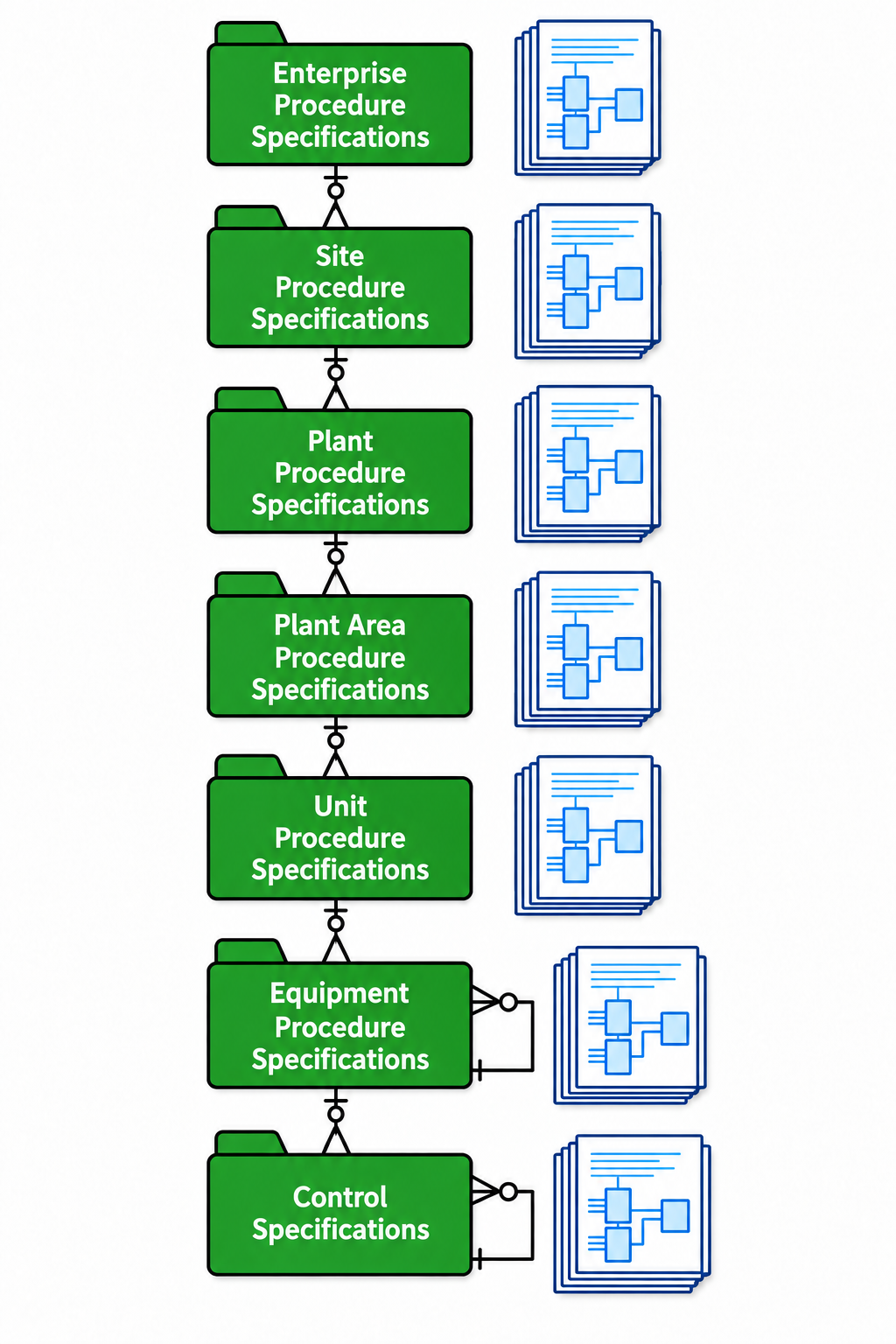
Figure 3 – Procedure Specification Model
This model defines the structured approach for documenting control procedures within automated systems. The procedure specification serves as a blueprint that translates high-level process requirements into executable control logic that can be implemented in programmable logic controllers (PLCs) or distributed control systems (DCS).
Key Components: The model typically includes input conditions (sensor states, operator commands), processing logic (control algorithms and decision trees), and output actions (actuator commands, alarm triggers). Each procedure must specify timing requirements, safety interlocks, and exception handling routines.
Note: When developing procedure specifications, ensure all state transitions are clearly defined and that fail-safe conditions are explicitly documented. This prevents undefined system behavior during abnormal operating conditions.
Industrial Example: In a batch reactor control procedure, the specification would detail each step from material charging through reaction completion, including temperature setpoints, pressure limits, and the sequence of valve operations required for safe operation.
The model framework ensures consistency across different control procedures and facilitates easier troubleshooting, maintenance, and system modifications during plant operations.
4.9.2 Procedure Specification Model – Enterprise
Enterprise Procedure Specifications define operational coordination requirements across multiple physical sites within a single enterprise (company or organization). These specifications operate at the highest level of the Physical Model hierarchy, governing how different manufacturing locations, facilities, or plants work together to achieve common business objectives.
Definition: The Physical Model refers to the hierarchical structure that represents real-world manufacturing assets, from individual equipment up to entire enterprises.
Industrial Example: An automotive manufacturer might use Enterprise Procedure Specifications to coordinate raw material flow between their steel processing plant in one state and their vehicle assembly plant in another state, ensuring synchronized production schedules.
Automating these enterprise-level specifications is typically impractical and rarely implemented due to the complex business logic, regulatory requirements, and strategic decision-making involved at this organizational level. Most coordination at this scale still requires human oversight and management intervention.
An Enterprise Procedure Specification may define the sequence of tasks needed to manage custody transfer operations between two facilities.
Definition: Custody transfer refers to the legal and operational handoff of product ownership from one party to another, typically involving precise measurement and documentation at the transfer point.
Industrial Example: This could include automated valve sequencing, flow meter calibration verification, and data logging procedures when transferring crude oil from a production facility to a pipeline operator.
4.9.3 Procedure Specification Model – Site
Site Procedure Specifications apply to a site within the Physical Model (the digital representation of your industrial facility’s physical assets and layout) and define how multiple plants coordinate their operations together.
Note: These specifications essentially act as the “master playbook” that ensures different production units or process areas work in sync rather than operating independently, which is critical for maintaining overall system efficiency and safety.
A Site Procedure Specification can define the specific tasks and sequence of actions needed to transition a facility or process area into a predetermined safe state (a controlled condition where all hazardous energy sources are isolated and equipment is secured).
Example: In a chemical processing plant, the Site Procedure Specification might outline steps like isolating steam lines, depressurizing vessels, stopping all rotating equipment, and engaging safety interlocks before maintenance personnel can enter the area. Each task would include specific valve positions, switch states, and verification checkpoints to ensure the safe state is properly achieved and maintained.
4.9.4 Procedure Specification Model – Plant
Plant Procedure Specifications define operational procedures for a plant within the Physical Model (the digital representation of your actual industrial facility) and establish how multiple plant areas, process units, or combinations of both work together in a coordinated manner.
Definition: These specifications serve as the blueprint for orchestrating complex, multi-area operations where different sections of your plant must execute sequential or parallel actions to achieve a desired process outcome.
Industrial Example: A startup sequence where the utilities area must establish steam and power before the reaction units can begin operation, while the control room coordinates the timing and monitors safety interlocks across all areas.
A Plant Procedure Specification may specify the sequential tasks required to start up a plant (such as valve opening sequences, pump startup order, and system pressurization steps).
Definition: A Plant Procedure Specification is a documented set of step-by-step instructions that operators follow to safely and efficiently execute plant operations.
Industrial Example: In a chemical processing plant, the startup specification might include pre-heating reactors to setpoint temperatures, establishing proper flow rates through control loops, and verifying all safety interlocks are functional before beginning production.
4.9.5 Procedure Specification Model – Plant Area
Plant Area Procedure Specifications apply to a plant area in the Physical Model (the digital representation of your actual plant layout and equipment hierarchy) and specify the coordination of multiple units operating within that defined area.
Definition: A plant area typically represents a section of your facility containing related equipment, such as a reactor section, distillation area, or utilities block.
Note: These specifications define how different process units or equipment within the same plant area should work together, including interlocks, sequencing, and shared resource management between units.
A Plant Area Procedure Specification may specify the tasks required to bring a plant area to a pre-defined safe state.
Definition: A safe state is a controlled operating condition where all equipment is positioned to minimize risk to personnel, equipment, and the environment - typically involving actions like shutting down processes, isolating energy sources, and venting pressurized systems.
Industrial Example: In a chemical processing unit, this might include closing feed valves, stopping pumps, depressurizing vessels, and activating emergency ventilation systems to reach a state where maintenance can safely begin.
4.9.6 Procedure Specification Model – Unit
Unit Procedure Specifications are configuration documents that apply to a specific unit within the Physical Model (the software representation of your actual plant equipment). When using State-Based Control (a control strategy where operations are organized into distinct states or phases), the Steps and Step Transitions between them are defined within these Unit Procedure Specifications.
Definition: Steps represent individual operations or phases in your process, while Step Transitions are the conditions that must be met to move from one step to the next.
This approach allows you to coordinate multiple pieces of equipment and field devices working together as a single functional unit. It also provides a higher-level abstraction, meaning you can think about and program complex operations in terms of logical steps rather than managing every individual device separately.
Industrial Example: Instead of separately programming a mixer motor, temperature sensor, and inlet valve, you can define steps like “Fill,” “Mix,” and “Drain” that automatically coordinate all the required equipment.
Unit Procedure Specifications define how a unit operates and how its control system manages both internal processes and coordination with other units in the plant. These specifications serve as the blueprint for the unit’s control strategy (the systematic approach to maintaining desired process conditions and responses).
Definition: A unit in this context refers to a major piece of process equipment or a collection of equipment that performs a specific function, such as a reactor, distillation column, or heat exchanger system.
The coordination between units can occur directly through unit-to-unit communication or indirectly through higher-level Plant Procedure Specifications (plant-wide control documents that manage overall facility operations). When a plant contains multiple identical units operating in parallel, engineers can develop one Unit Procedure Specification and apply it across all similar units, reducing documentation overhead while maintaining consistency.
Industrial Example: In a chemical plant with three identical reactors, a single Unit Procedure Specification would cover the control logic, safety interlocks, and operational sequences for all three reactors, rather than creating separate documents for each one.
Unit Procedure Specifications can define how Equipment Procedure Specifications, Control Specifications, or both should operate by using the Mode of Operation parameter (detailed in Section 5.3.2).
Definition: Unit Procedure Specifications are higher-level control documents that coordinate multiple equipment units or control loops to accomplish a specific process step, such as a batch mixing operation or material transfer sequence.
Note: The Mode of Operation parameter acts as a control flag that determines which operational behavior or control strategy should be active at any given time, allowing the same procedure to adapt to different process conditions or requirements.
A Unit Procedure Specification may specify the tasks required to bring a distillation column to a pre-defined safe state during a process upset (an abnormal operating condition that deviates from normal process parameters).
Industrial Example: During a temperature excursion or pressure spike in the column, the Unit Procedure Specification would define the exact sequence of control actions - such as reducing reboiler duty, adjusting reflux rates, or activating emergency venting - to safely return the column to stable operating conditions.
Note: The “pre-defined safe state” is typically established during the hazard analysis phase and represents operating conditions where all process variables are within acceptable safety limits.
Example 2: A Unit Procedure Specification may define specific procedure actions that handle transitions between different process steps, such as moving from a FILLING step to a HEATING step.
Definition: Unit Procedure Specifications are detailed instructions that define how a process unit should operate, including the sequence of steps and the actions needed to move between them.
Industrial Example: In a batch reactor, when transitioning from FILLING to HEATING, the procedure actions might include closing inlet valves, starting the agitator, and enabling the heating system while verifying that the fill level meets requirements before proceeding.
4.9.7 Procedure Specification Model – Equipment
Equipment Procedure Specifications define the operational behavior for equipment components within the Physical Model (the digital representation of your actual plant equipment). When implementing State-Based Control (a control strategy that organizes equipment operation into distinct operational states), these specifications contain two key elements: Equipment Steps, which represent the individual Control States that equipment can occupy, and Step Transitions, which define the State Transitions that allow movement between these states.
Purpose: This approach provides a higher-level abstraction layer that simplifies complex equipment operation by breaking it into manageable states, while enabling coordinated control of multiple devices working together.
Industrial Example: A pump system might have Equipment Steps like “Stopped,” “Starting,” “Running,” and “Stopping,” with Step Transitions defining the conditions needed to move between each state (such as pressure feedback confirming successful startup before transitioning from “Starting” to “Running”).
When you have multiple pieces of identical equipment in your facility, you can use one Equipment Procedure Specification for all of them. This approach maximizes code reusability because the specification is based on the equipment’s physical operating characteristics rather than what specific process it’s serving.
Definition: Equipment Procedure Specifications define standardized operational procedures and safety limits that apply to specific equipment types, regardless of their application.
Industrial Example: A centrifugal pump’s deadhead condition (operating against a closed discharge valve with no flow) must be prevented whether that pump is handling water in a cooling system, diesel fuel in a transfer operation, orange juice in food processing, or ice cream mix in dairy production. The pump’s mechanical limitations remain the same across all applications.
Note: This equipment-centric approach simplifies maintenance, reduces engineering time, and ensures consistent safety practices across different process units.
An Equipment Procedure Specification may specify the operation of a pump set that coordinates multiple pumps and valves working together as a system.
Industrial Example: In a water treatment facility, an Equipment Procedure Specification might define how three parallel pumps automatically start and stop in sequence based on flow demand, while coordinating with inlet and outlet isolation valves to maintain system pressure within setpoints.
Note: Equipment Procedure Specifications differ from basic control loops because they orchestrate multiple field devices according to operational logic rather than just maintaining a single process variable at its setpoint.
4.9.8 Procedure Specification Model – Control
Control Specifications define the regulatory and discrete control strategies that are applied to field devices (sensors, actuators, and other control elements). These specifications serve as the fundamental building blocks for all automated procedures in a control system.
Definition: A device refers to any individual field instrument such as a temperature sensor, control valve, or motor starter that interfaces with the process.
Control Specifications contain the detailed instructions and parameters that govern how a collection of one or more devices should operate together as a single functional unit. Rather than controlling each device independently, the specification treats this group as one coordinated entity with unified control logic.
Industrial Example: A temperature control loop might include a temperature transmitter, PID controller, and control valve - the Control Specification would define how these three devices work together to maintain setpoint, including tuning parameters, alarm limits, and control modes.
This approach allows control engineers to design and implement complex automation strategies by organizing individual field devices into logical control groups with clearly defined operational requirements.
A regulatory control loop is a feedback control system designed to maintain a process variable (PV) at a desired setpoint by continuously measuring, comparing, and adjusting the controlled variable. Common examples include temperature control loops that maintain reactor temperatures, pressure control loops that regulate vessel or pipeline pressures, and level control loops that keep tank levels within specified ranges.
Note: These are the most fundamental control loops you’ll encounter in industrial settings, typically using PID controllers to automatically adjust valve positions, pump speeds, or heater outputs based on sensor feedback.
Control Specifications are typically defined during the process design phase of a project. However, you’ll often need to put in additional engineering work to incorporate capabilities that support automated procedures and sequences.
Note: While basic control loops (like PID controllers for temperature or pressure) are usually specified upfront, the logic and interlocks needed for automated startup, shutdown, or batch sequences often require separate analysis and design effort.
Industrial Example: A distillation column design might specify temperature and pressure control loops, but automating the full startup sequence (including valve sequencing, heating ramp rates, and safety interlocks) typically requires additional control system development beyond the initial specifications.
When your facility has multiple identical devices (such as several pumps, valves, or motors of the same model), you can use one Control Specification document to cover all of them rather than creating separate specifications for each unit.
Practical Benefit: This approach saves significant documentation time and ensures consistency across similar equipment. For instance, if you have five identical cooling water pumps, they would all follow the same control logic, safety interlocks, and operational parameters defined in a single specification.
Note: Make sure the devices are truly identical in function and control requirements before applying this approach - even small differences in process conditions or safety requirements may warrant separate specifications.
A Control Specification for a product pump may specify that the discharge pressure is controlled using the pump recycle valve (a valve that redirects flow from the pump discharge back to the suction side).
Industrial Example: In a chemical processing facility, when discharge pressure rises above setpoint, the recycle valve opens to reduce the net flow through the system while maintaining pump operation, effectively lowering the discharge pressure without stopping the pump.
Note: This control strategy is commonly used instead of throttling the main discharge valve because it prevents pump damage from low-flow conditions while maintaining pressure control.
4.10 Procedure Implementation Model
The Procedure Implementation Model in Figure 4 displays the hierarchical structure of implementation modules created when procedure specifications are put into practice in a control system. These implementation modules are shown as rounded rectangles to clearly differentiate them from procedure specifications (shown in the Procedure Specification Model) and physical equipment (shown in the Physical Model).
Definition: Implementation modules are the actual configured or programmed components that result from translating procedure specifications into working control system code.
It’s recommended that your work process follows the Procedure Implementation Model’s format and content, ensuring it meets the specific requirements of your application (fit for purpose). These implementation modules are built using both the procedure specifications and information from the Physical Model - essentially bridging the gap between what you want the system to do and the actual equipment it controls.
Note: The Procedure Implementation Model starts at the site level rather than including an enterprise level. This is because enterprise-level procedure specifications are typically implemented directly in Site Implementation Modules or at lower hierarchical levels within the model.
The connecting lines between model levels indicate a hierarchical relationship where each upper level can contain zero or multiple lower-level objects. This flexible structure allows for scalable implementation across different facility sizes and complexity levels.
4.10.1 Requirement
The Procedure Owner shall ensure that the implementation modules be created based upon procedure specifications and the contents of the Physical Model.
Definition: Implementation modules are the software components that execute the actual control logic in your system, while the Physical Model represents the mathematical description of your plant or process being controlled.
Note: This step translates your control strategy from design documents into executable code that will run on your controller hardware (like PLCs or DCS systems).
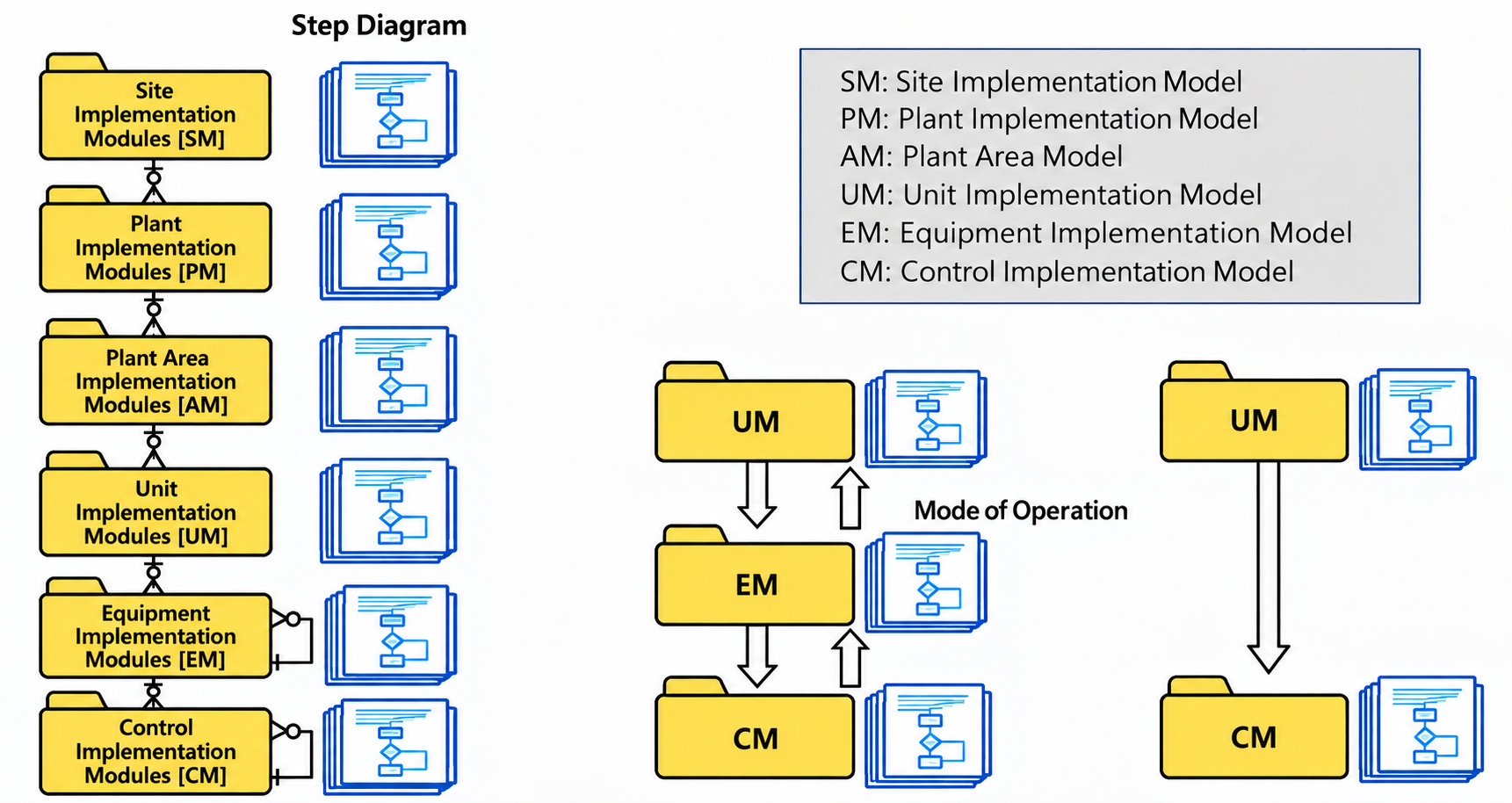
Figure 4 – Procedure Implementation Model
This model shows how control procedures are structured and executed within a process control system. The implementation follows a hierarchical approach where higher-level procedural logic coordinates lower-level control actions.
Key Components: The module typically includes procedure states (idle, running, paused, complete), transition conditions that determine when to move between states, and action blocks that contain the actual control commands. Each procedure can call sub-procedures, creating a nested structure that mirrors the complexity of industrial processes.
Note: Understanding this module is essential for implementing sequential control functions like batch operations, startup/shutdown sequences, and safety interlocks. The state-based approach ensures predictable behavior and allows operators to monitor procedure progress through the HMI (Human Machine Interface).
Practical Application: When designing procedures, consider fail-safe states and manual override capabilities. Always include proper exception handling for equipment faults or operator interventions that might interrupt normal execution flow.
4.10.2 Site Implementation Modules
Site Implementation Modules are software components that correspond to physical sites in the Physical Model (the digital representation of your plant or facility) and are responsible for executing procedure specifications. These modules translate high-level procedure requirements into actual control logic that can be deployed to field devices.
Definition: Implementation modules act as the bridge between what you want your process to do (the procedure specification) and how the control system actually makes it happen.
The implementation modules are typically derived from two main sources: enterprise-level procedure specifications (company-wide standards and policies) and Site Procedure Specifications (site-specific operating procedures tailored to local equipment and requirements). This hierarchical approach ensures both consistency across the enterprise and flexibility to accommodate site-specific constraints and equipment configurations.
Site Implementation Modules can execute severe weather procedure specifications to protect facility operations and equipment. These procedures include de-inventory operations (systematically emptying storage tanks and vessels) for hurricane preparedness or fill tank operations for flood preparedness.
Industrial Example: During hurricane season, the module might automatically trigger sequences to safely drain process tanks and transfer contents to secure storage, while for flood conditions, it could initiate tank filling to prevent buoyancy issues and structural damage.
Note: These weather-specific control sequences are typically pre-programmed with manual override capabilities and require coordination with emergency shutdown systems (ESD) and safety instrumented systems (SIS).
4.10.3 Plant Implementation Modules
Plant Implementation Modules are software components that correspond to a specific plant in the Physical Model (the digital representation of your facility’s physical structure and hierarchy). These modules execute the actual procedure specifications that define how operations should be carried out.
The implementation modules typically originate from three levels of procedure specifications: Enterprise-level (company-wide standards), Site-level (facility-specific requirements), and Plant-level (individual plant operations). This hierarchical approach ensures consistency across the organization while allowing for local customization.
Primary Function: Plant Implementation Modules are typically used to coordinate operations across multiple plant areas, production units, or both simultaneously. Rather than managing individual equipment pieces, they orchestrate higher-level activities that span across different sections of your facility.
Note: Think of these modules as the “conductors” that ensure different parts of your plant work together according to the defined procedures, maintaining coordination between various areas that need to operate in sequence or parallel.
Plant Implementation Modules (PIMs) can be used to handle various operational procedures including plant start-up sequences, controlled shut-down processes, abnormal condition recovery protocols, production scheduling tasks, and product transfer operations.
Definition: Plant Implementation Modules are pre-configured software blocks that contain the logic and sequencing required for specific plant operations, making it easier to implement standardized procedures across different process units.
Industrial Example: During a reactor start-up, a PIM would automatically execute the proper valve sequencing, temperature ramping, and safety interlocks rather than requiring manual coordination of each step by the operator.
Product change transition can be executed using a Plant Implementation Module (PIM). The PIM serves as a structured framework that manages the sequential steps required when switching between different product specifications or formulations in a manufacturing process.
Note: During product transitions, the PIM coordinates control logic changes, setpoint adjustments, and equipment reconfiguration to ensure smooth changeover while maintaining process stability and product quality standards.
Industrial Example: In a chemical reactor switching from Product A to Product B, the PIM would automatically sequence through purging operations, temperature ramp adjustments, feed rate changes, and catalyst modifications according to predefined transition procedures.
4.10.4 Plant Area Implementation Modules
Plant Area Implementation Modules are software components that correspond to specific plant areas defined in the Physical Model (the digital representation of your facility’s equipment and layout) and execute procedure specifications within those areas. These modules are typically created based on procedure specifications from different organizational levels: Enterprise, Site, Plant, and Plant Area levels.
Key Distinction: Plant Area Implementation Modules function similarly to Plant Implementation Modules but have a narrower scope - they only apply to their designated plant area rather than the entire facility.
Common Use Case: These modules are primarily used to coordinate operations across multiple process units within the same plant area. For example, a Plant Area Implementation Module might manage the startup sequence for several reactors and their associated separation units in a chemical processing area.
Note: Not every control system implementation will require Plant Area Implementation Modules. Their use depends on your plant’s organizational structure and whether you need coordinated control at the area level rather than just unit-level or plant-wide control.
The Plant Area Implementation Modules can be configured to handle procedure specifications for distinct operational zones within major process facilities. In an Ethylene plant, these modules would typically manage the Hot section (where cracking and high-temperature reactions occur) and Cold section (separation and recovery operations at lower temperatures). Similarly, in an LNG plant implementation, the modules would control the Front End operations (gas treating area where impurities are removed from natural gas) and the Back End processes (liquefaction area where treated gas is cooled to liquid state for storage and transport).
Note: Each Plant Area Implementation Module essentially acts as a dedicated control interface for a specific process area, allowing for modular programming and maintenance of complex industrial facilities.
4.10.5 Unit Implementation Modules
Unit Implementation Modules are software components that directly correspond to physical units in your plant’s Physical Model and serve as the execution layer for procedure specifications (the detailed instructions that define how operations should be carried out). These modules can contain portions of multiple procedure specifications that may come from different hierarchical levels within the Procedure Specification Model.
Note: Think of Unit Implementation Modules as the “local supervisors” for each major piece of equipment or process unit in your facility.
While Unit Implementation Modules can receive coordination from higher-level Plant or Plant Area Implementation Modules, they are designed to operate with significant independence from one another. This autonomous operation helps ensure that issues in one unit don’t cascade to affect other units unnecessarily.
Unit Implementation Modules serve as coordinators themselves, managing the lower-level Equipment Implementation Modules (which handle individual devices like valves, pumps, or sensors) and Control Implementation Modules (which execute specific control algorithms), or both depending on the unit’s complexity.
Industrial Example: A distillation column’s Unit Implementation Module might coordinate several Equipment Implementation Modules for reboilers and condensers, while also managing Control Implementation Modules for temperature and pressure control loops.
A Unit Implementation Module coordinates sequential operational steps including START-UP, RUNNING, SHUTDOWN, ABNORMAL SITUATION handling, safety interlocks, and process equipment protection logic. This module acts as the central coordinator that manages state transitions (the orderly progression from one operating mode to another) for a complete process unit.
Industrial Example: In a distillation column unit, the module would sequence through startup heating, establish normal reflux operation, manage controlled shutdown procedures, and activate protective actions like emergency venting if abnormal conditions are detected.
Note: Each operational step contains its own set of control logic and safety checks that must complete successfully before advancing to the next state.
4.10.6 Equipment Implementation Modules
Equipment Implementation Modules (EIMs) represent the actual implementation of procedure specifications for small, related groups of equipment and devices within the Physical Model (the digital representation of your actual plant hardware). These modules translate high-level procedure requirements into executable control logic for specific equipment clusters.
Definition: Think of an EIM as the control software package that manages a group of related field devices - like a pump, its associated valves, and flow transmitter working together as a coordinated unit.
EIMs typically operate under the coordination of Unit Implementation Modules (UIMs), which manage broader plant operations at the process unit level. However, EIMs can also be operated directly by plant operators when manual intervention is required, such as during maintenance activities or emergency situations.
Industrial Example: A reactor feed system EIM might control the feed pump, inlet control valve, and flow measurement devices as one coordinated package, receiving setpoints from the reactor’s UIM while allowing operators to manually override when needed.
An Equipment Implementation Module is a software block that contains all the control logic needed to operate a piece of process equipment through its complete lifecycle: startup, normal operation, handling fault conditions, and shutdown. Think of it as the “brain” that manages everything your equipment needs to do.
Definition: Control Implementation Modules are smaller logic blocks that handle specific control functions like PID loops, valve positioning, or motor control.
The module can act as a parent container, meaning it can hold other Equipment Implementation Modules underneath it (for sub-equipment) as well as Control Implementation Modules (for specific control functions like loops or interlocks). This creates a hierarchical structure where complex systems are broken down into manageable pieces.
Key Benefit: Equipment Implementation Modules allow you to control multiple similar pieces of equipment using the same standardized logic block, which means less programming work and a consistent operator interface. Instead of writing separate code for each pump or heat exchanger, you can use one proven module template across similar equipment.
Industrial Example: A pump Equipment Implementation Module might contain Control Implementation Modules for motor control, flow control, and vibration monitoring, while managing the overall pump startup sequence and shutdown procedures.
Equipment Implementation Modules are designed to standardize the operation of similar process equipment across your facility. Think of these modules as reusable software templates that contain the control logic, operator interfaces, and communication protocols specific to a particular type of equipment (like pumps, valves, or heat exchangers).
Key Benefits: This standardized approach provides consistent functions and interfaces for both operators and higher-level control modules (such as Unit Modules or Procedure Control modules). More importantly, it enables you to develop a library of proven Equipment Implementation Modules that can be deployed across multiple identical or similar pieces of process equipment.
Industrial Example: Instead of writing separate control logic for each of your facility’s 20 centrifugal pumps, you create one standardized Equipment Implementation Module for centrifugal pumps. This module can then be instantiated and configured for each individual pump, ensuring consistent operation, reduced engineering time, and simplified maintenance.
This modular approach reduces engineering effort, minimizes programming errors, and ensures that operators see the same interface regardless of which specific piece of equipment they’re controlling within the same equipment class.
Example 1: A pump Equipment Implementation Module (EIM) is a software block that contains all the control logic needed to operate and monitor a complete pump system. This module handles the pump motor itself, tracks the pump’s running status feedback, and controls the automated suction and discharge valves that work with the pump. It also monitors the limit switches on these valves (which provide position feedback to confirm if valves are actually open or closed).
Key Functions: The pump EIM can start and stop the pump motor, continuously monitor the system for abnormal operating conditions like valve failures or stuck positions, and execute a controlled shutdown sequence if it detects serious problems that could damage equipment or create unsafe conditions.
Note: This modular approach keeps all pump-related logic organized in one place, making it easier to troubleshoot, maintain, and reuse across different projects. The EIM essentially acts as the “brain” for the entire pump package rather than having control logic scattered throughout the main program.
Example 2 Building upon the pump Equipment Implementation Module from example 1, two individual implementation modules can be combined to create a dual pump Equipment Implementation Module. This dual pump module contains the control logic necessary to start either a single pump or both pumps simultaneously, based on the received command signal.
Note: Equipment Implementation Modules are standardized control blocks that contain all the logic, interlocks, and operating sequences for specific equipment types.
When operating in single-pump mode, the system includes an automatic alternation feature that periodically switches operation from the running pump to the standby pump. This rotation logic ensures balanced runtime hours across both pumps in the pump set, extending overall equipment life and maintaining system reliability.
Industrial Example: If Pump A has been running for 8 hours and reaches the programmed alternation setpoint, the control logic will start Pump B, allow a brief overlap period, then stop Pump A.
The dual pump module also provides automatic backup functionality. If the currently running pump experiences an abnormal condition (such as motor overload, low discharge pressure, or vibration alarm), the standby pump automatically starts while the faulted pump is stopped and placed in an alarm state. This failover operation maintains process continuity and protects equipment from damage.
4.10.7 Control Implementation Modules
Control Implementation Modules represent the actual code and logic that execute Control Specifications (the documented control strategies and requirements) on physical devices like valves, pumps, and sensors in your plant. These modules translate your control strategy into executable instructions that the hardware can understand and act upon.
In most cases, Control Implementation Modules should be coordinated through Unit or Equipment Implementation Modules (higher-level modules that manage entire process units or equipment packages). This hierarchical approach helps maintain organized control architecture and prevents conflicts between different control functions. However, these modules can also be operated directly by plant operators when manual intervention is needed, such as during startup, shutdown, or emergency situations.
Note: This modular approach allows you to separate your control logic from the physical hardware implementation, making it easier to maintain, troubleshoot, and modify your control systems without affecting the overall plant operation.
A Control Implementation Module contains the control logic required to operate associated devices. This module can integrate multiple inputs and outputs into a single control function, allowing you to consolidate related control tasks rather than managing them separately.
Definition: A Control Implementation Module can contain both regulatory control (continuous control like PID loops for temperature or pressure) and discrete control (on/off logic for valves, pumps, or motors).
Important Note: Control Implementation Modules should not contain procedure steps and transitions (the sequential logic that defines “do this, then do that”). These procedural elements should be implemented at higher levels in the control hierarchy, typically within equipment modules or unit modules above them.
Industrial Example: Instead of putting startup sequences or batch recipes in your Control Implementation Module, focus on the core control functions like maintaining a temperature setpoint or controlling a motor’s speed. The startup sequence would be handled by the equipment module that calls your Control Implementation Module.
4.10.8 Requirement
The Procedure Owner shall ensure that Control Implementation modules do not contain procedure steps and transitions.
4.10.9 Requirement
These steps and transitions should be implemented at a higher level such as within equipment modules or above modules.
Note: This separation maintains proper system architecture by keeping basic control functions distinct from procedural logic, making the system easier to troubleshoot and modify. A Control Implementation Module can serve as a parent container that holds other Control Implementation Modules within it, creating a hierarchical structure. This nested arrangement allows for organizing control logic into manageable subsystems, where higher-level modules coordinate the operation of their subordinate (child) modules.
Industrial Example: A main reactor control module might contain subordinate modules for temperature control, pressure control, and flow control - each handling their specific control loops while reporting to the parent module.
Note: This hierarchical approach is commonly used in distributed control systems (DCS) and programmable logic controllers (PLCs) to break down complex processes into smaller, more manageable control blocks. A Control Implementation Module may consist of logic for a regulating device that includes a transmitter (sensor that measures the process variable), a controller (device that compares the measured value to the desired setpoint), and a control valve that responds to the controller’s output signal based on the controller’s setpoint configuration.
Industrial Example: In a temperature control loop, the transmitter would be a temperature sensor, the controller processes the temperature reading against the desired temperature setpoint, and the control valve adjusts steam or cooling water flow to maintain the target temperature. A Control Implementation Module may consist of logic for a device that includes an on/off automatic block valve with position feedback switches (limit switches that confirm whether the valve is fully open or closed).
Definition: A Control Implementation Module is a software component that contains the specific control logic and programming for operating a particular field device or group of related devices.
Industrial Example: In a typical implementation, the module would receive an open/close command from the operator or higher-level control system, send the appropriate signal to the valve actuator, then monitor the feedback switches to verify the valve reached the commanded position and update the system status accordingly. A multimode or cascade control strategy can be implemented as a Control Implementation Module that contains another Control Implementation Module nested within it.
Definition: A cascade control strategy uses two controllers in series, where the output of the primary (outer) controller becomes the setpoint for the secondary (inner) controller. Multimode control allows switching between different control strategies based on operating conditions.
Industrial Example: In a temperature control system, the outer loop controls reactor temperature while the inner loop controls steam valve position. This entire cascade arrangement would be one Control Implementation Module containing a secondary Control Implementation Module for the inner steam control loop.
Note: This nested structure allows complex control strategies to be organized as modular, reusable components within the overall control system architecture. An analog input configured with an alarm function qualifies as a Control Implementation Module (CIM). This combination creates a functional control element because the analog input provides the measurement data while the alarm logic performs the control decision-making based on predetermined setpoints.
Definition: A Control Implementation Module is a software or hardware component that combines measurement, logic, and output functions to perform a specific control task.
Industrial Example: A temperature transmitter (4-20mA signal) connected to a PLC input module with high/low alarm logic programmed to trigger safety actions when temperature exceeds safe operating limits. This standard defines two distinct models: the Physical Model and the Implementation Model, both of which align with the ISA-88 Physical Model framework (the widely-used batch control standard). However, there are some key differences to understand.
Control Implementation Modules in this standard differ from traditional ISA-88 control modules in an important way - they focus solely on control functions and logic, while the physical hardware components are separately represented by devices within the Physical Model. This separation provides cleaner distinction between software control logic and physical equipment.
Key Difference: ISA-88 typically excludes regulatory control (continuous control like PID loops) from its Physical Model scope, treating it as outside the batch control framework. This standard takes a more comprehensive approach by incorporating regulatory control directly into the Implementation Model. What ISA-88 classifies as “basic control” - such as flow control, temperature control, and pressure regulation - is fully integrated into this standard’s Implementation Model.
Note: This integration means you can design both batch sequencing logic and continuous regulatory control within the same model framework, which can simplify system architecture for processes that combine both batch and continuous operations.
4.11 Model Summary
Figure 5 shows the Procedure Specification Model, the Procedure Implementation Model, and the Physical Model.
Note: These three models work together to represent different aspects of your control system. The Procedure Specification Model defines what your process should do (the recipe or sequence), the Procedure Implementation Model describes how the control logic will execute those procedures, and the Physical Model represents the actual equipment and instrumentation in your plant.
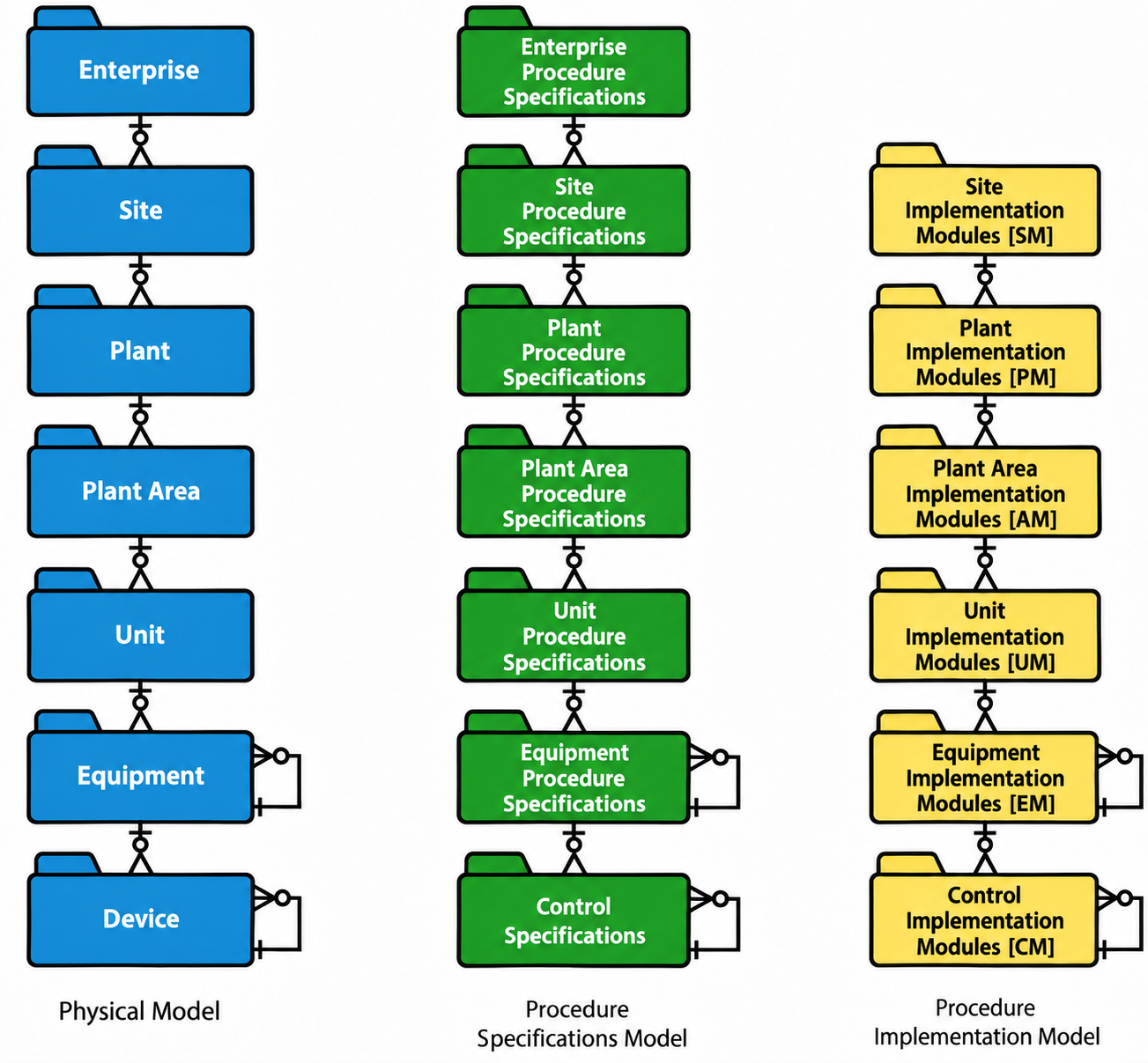
Figure 5 – Model Summary
This model summary provides a consolidated view of the system’s mathematical representation used for control design. The summary typically includes key parameters such as the system’s transfer function coefficients, state-space matrices (A, B, C, D matrices that define system dynamics), and relevant time constants or natural frequencies.
Note: Model summaries are essential for validating that your derived mathematical model accurately represents the physical system before proceeding with controller design. They serve as a quick reference for the plant characteristics you’ll need when tuning your control loops.
Industrial Example: In a temperature control application, the model summary might show the process gain (how much temperature changes per unit of heater power), time delay (how long it takes to see a response), and time constant (how quickly the system reaches steady state).
4.12 Collapsibility
Collapsibility is a key feature that applies to all three model types used in control system design: physical models, procedure specifications, and procedure implementation models. Collapsibility means you can skip or omit certain hierarchical levels within any of these models when they’re not needed for your specific application.
Practical Application: Rather than always using every level of detail in a model hierarchy, you only need to develop and use the model levels that are relevant to your particular control problem. This approach saves time and reduces complexity while maintaining the accuracy needed for your application.
Note: The ability to collapse model levels allows engineers to scale their modeling approach based on system complexity, available resources, and performance requirements without compromising the overall control system design methodology.
Figure 6 demonstrates how the Physical Model hierarchy can be simplified by removing unnecessary organizational levels based on your specific facility structure. In example (a), which represents a small, single-facility operation, the site and plant model levels are omitted since they would be redundant layers. In example (b), the enterprise, site, and plant area model levels are excluded from the hierarchy.
Note: The Physical Model refers to the ISA-95 standard’s way of organizing manufacturing operations into hierarchical levels (enterprise, site, area, work center, etc.). By collapsing unused levels, you can create a control system architecture that matches your actual facility organization without unnecessary complexity.
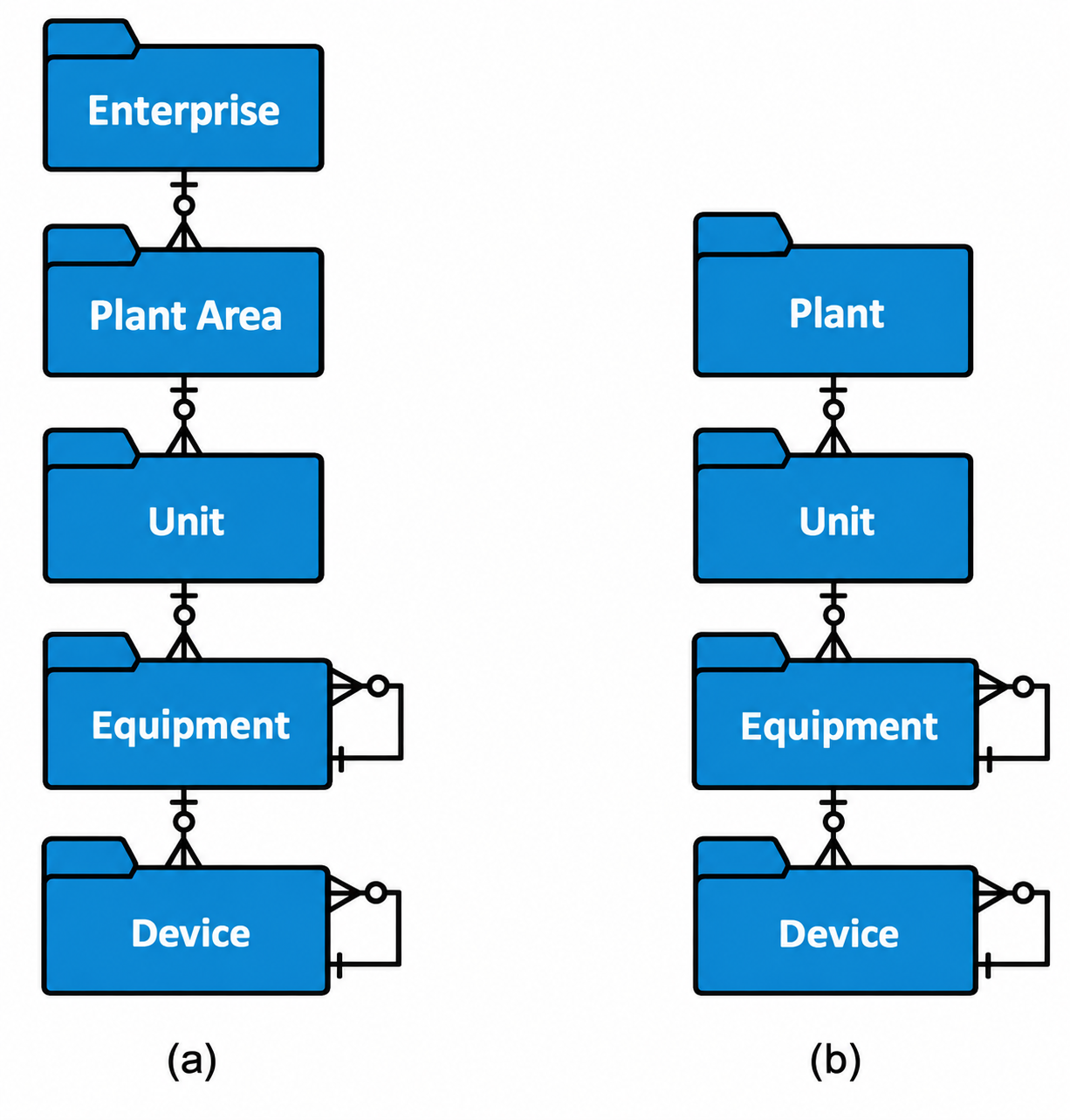
Figure 6 – Example of Collapsed Physical Models
This figure demonstrates how complex physical systems can be simplified into reduced-order models (mathematical representations with fewer state variables) while preserving the essential dynamic behavior needed for control design. In control engineering, we often deal with high-order systems that are computationally expensive and difficult to analyze, so model reduction techniques help us create more manageable representations.
Definition: Collapsed or reduced-order models maintain the dominant system dynamics (the most significant poles and zeros) while eliminating less critical states that don’t significantly impact the control performance.
Practical Application: When designing controllers for large industrial systems like multi-zone HVAC systems or complex chemical processes, engineers typically start with detailed physical models containing dozens of states, then apply reduction techniques to create simpler models with 3-5 dominant states for controller synthesis.
The collapsed models shown retain sufficient accuracy for control purposes while enabling faster simulation times and simpler controller tuning procedures. This approach is particularly valuable during the initial control design phase when multiple iterations and parameter studies are required.
Figure 7 demonstrates that when implementing the complete Physical Model, you can skip or duplicate model levels based on your specific application requirements.
Definition: Model levels refer to the hierarchical layers in the physical model structure
(plant area → unit → equipment → device).
The figure illustrates that a device can be directly linked to a plant area or unit without necessarily being tied to a specific piece of equipment first. This flexibility means you’re not locked into a rigid hierarchy - you can establish direct relationships where they make sense for your system.
Similarly, the model allows for nested relationships: equipment can contain other equipment (such as a reactor system containing multiple heat exchangers), and devices can contain other devices (like a smart valve assembly containing multiple sensors and actuators).
Note: This hierarchical flexibility is particularly useful when modeling complex industrial processes where strict organizational boundaries don’t always reflect the actual physical or functional relationships between components.
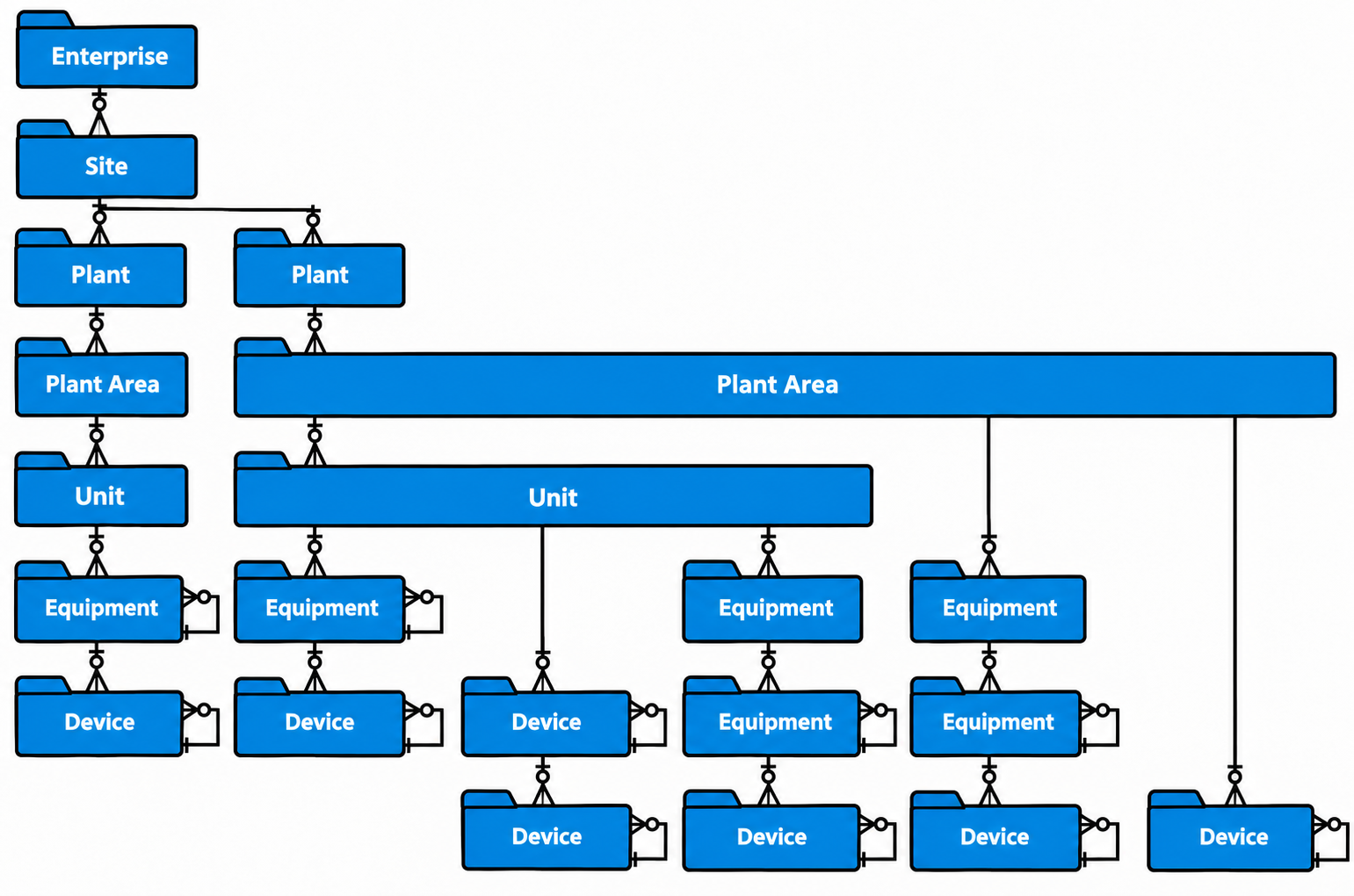
Figure 7 – Example of Different Collapsibility Techniques
This figure demonstrates various methods for reducing the complexity of control system models while preserving their essential dynamic characteristics. Collapsibility techniques are mathematical approaches used to simplify high-order systems (systems with many states or complex transfer functions) into lower-order equivalents that are easier to analyze and implement.
Common techniques shown may include: - Model order reduction through pole-zero cancellation (eliminating dominant poles and zeros that nearly cancel each other) - State aggregation methods that combine multiple system states into fewer representative states - Frequency-domain approximations that maintain accuracy within the system’s operating bandwidth
Practical Note: When applying these techniques in industrial control applications, always verify that the simplified model maintains adequate accuracy across your expected operating conditions and disturbance ranges. The reduced-order model should preserve the critical dynamics that affect your control objectives while eliminating less significant modes that mainly add computational complexity.
These techniques are particularly valuable when designing controllers for implementation on PLCs or embedded systems where computational resources are limited, or when performing initial system analysis and controller tuning.
While Figure 7 shows equipment and devices directly associated with the plant area, this approach may also be applied to minor pieces of process equipment that are either shared by multiple units or perform auxiliary processing functions (such as utility systems, shared pumps, or secondary treatment equipment).
Note: Shared equipment typically includes items like cooling water systems, compressed air units, or common analytical instruments that serve multiple process areas but don’t belong to a single unit’s main control strategy.
Example 1: Environmental equipment requiring interactive control and coordination between the air handling fans, exhaust, and intake louvers (dampers that regulate airflow), filtration equipment, heating/chilling equipment for purposes of providing clean, constant temperature air under pressure to a clean-room facility.
Control Challenge: This system requires a multi-variable control strategy where each component must work together to maintain precise environmental conditions. The control system typically uses feedback loops to monitor air pressure, temperature, and cleanliness levels while adjusting fan speeds, damper positions, and HVAC equipment accordingly.
Note: Clean-room applications demand tight control tolerances since even small deviations in pressure or temperature can compromise product quality or contaminate sensitive processes.
Example 2 Instrument air supply equipment such as multiple compressors, filtration, drying equipment, and associated valving.
Definition: Instrument air is clean, dry compressed air (typically 100-125 psig) used to operate pneumatic control valves, actuators, and other field instruments in process plants.
Industrial Example: A typical instrument air system includes backup compressors for redundancy, moisture removal dryers (to prevent freezing and corrosion), particle filters, and isolation valves that allow maintenance on individual components while keeping the system operational. This equipment is critical since loss of instrument air can cause control valves to fail to their designed safe positions, potentially shutting down entire process units.
Example 3 Wastewater collection and removal equipment (sumps, pumps, and valving) for a paper machine.
Industrial Context: Paper manufacturing generates significant wastewater containing fiber residue, chemicals, and process water that must be efficiently collected and removed to maintain production flow and meet environmental standards.
Key Components: - Sumps - Collection tanks or pits that gather wastewater from various paper machine processes before transfer
Pumps - Typically centrifugal pumps sized to handle the flow rates and head requirements for moving wastewater to treatment facilities
Valving - Control and isolation valves that regulate flow direction, manage system pressure, and allow for maintenance isolation
Control Considerations: This system requires level control in the sumps (often using float switches or ultrasonic sensors), pump sequencing logic to prevent dry running, and flow control through automated valving. The control strategy must account for varying wastewater generation rates during different paper production phases and coordinate with upstream process controls to prevent overflow conditions.
When automating procedures using procedure specifications, procedure implementation, and physical models, applying collapsibility (the ability to simplify complex models by removing or combining certain hierarchical levels) can create many different combinations of model complexity levels. Each individual model within your system may collapse or eliminate different levels of detail depending on its specific purpose.
Important Design Consideration: You should carefully evaluate which model levels to include in each model and establish a unified approach and design philosophy across your entire automation application. This consistency helps ensure reliable operation and makes the system easier to understand, troubleshoot, and maintain.
Example: In a distillation column control system, your high-level supervisory model might collapse detailed valve dynamics, while your low-level regulatory control model retains these details for precise actuator control.
Figure 8 demonstrates how the collapsibility concept (the ability to reduce model complexity while maintaining essential dynamics) can be implemented when utilizing all three control models simultaneously.
Note: In practice, this approach allows you to switch between different model complexities based on your current control objectives - using a detailed model for design validation and simpler collapsed versions for real-time implementation.
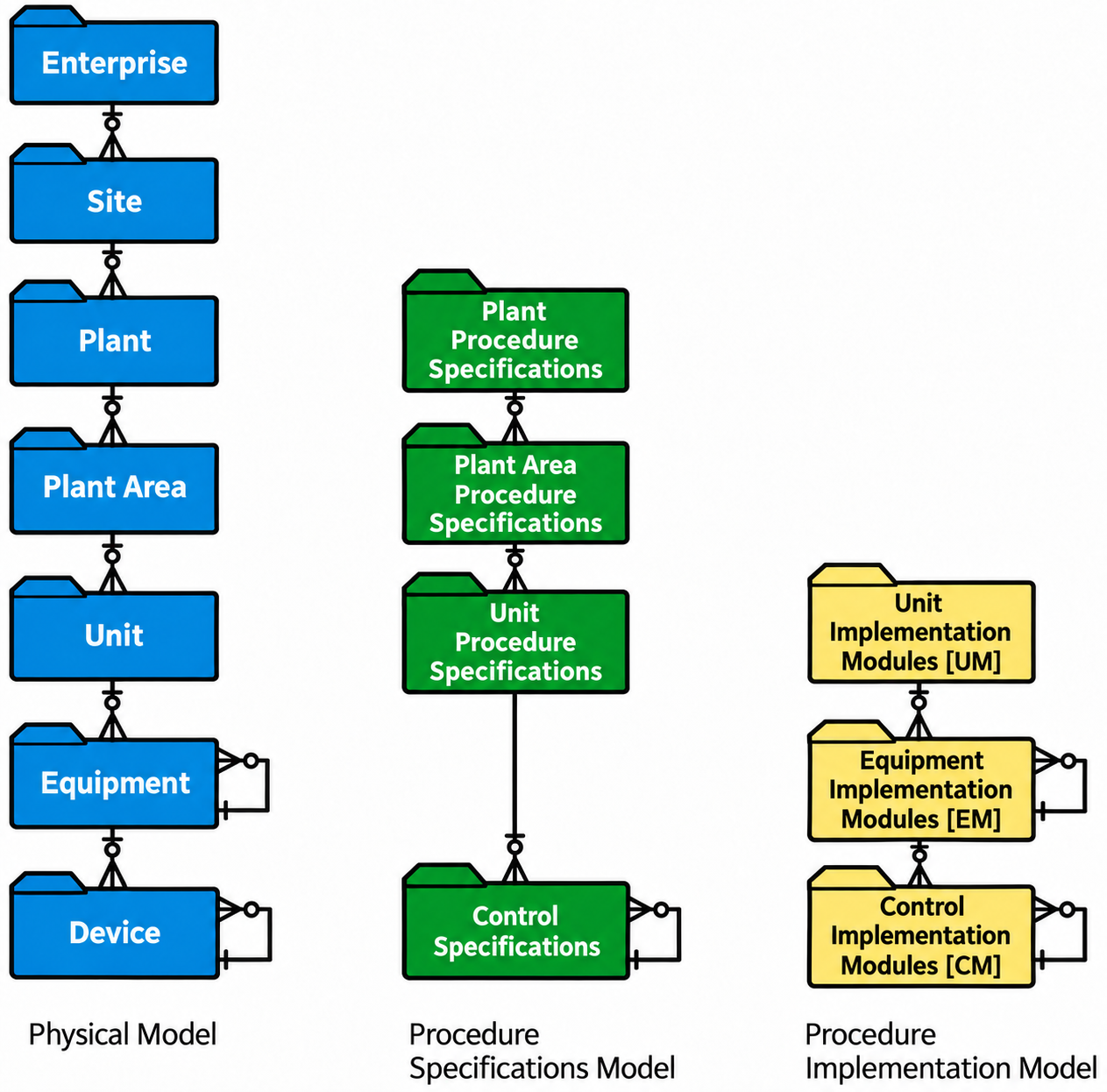
Figure 8 – Examples of Collapsibility
This figure demonstrates collapsibility, which refers to a system’s ability to reduce its dimensional complexity under certain conditions (essentially, when some states become dependent on others or can be eliminated from analysis). In control systems, collapsibility occurs when the system’s behavior can be accurately described using fewer state variables than the original model suggests.
Key scenarios shown:
Steady-state conditions: When transients die out, dynamic states may collapse to algebraic relationships
Fast-slow dynamics: Rapidly settling states can often be treated as instantaneous, reducing the system order
Structural dependencies: When certain states are linear combinations of others, the effective system dimension decreases
Practical implication: Recognizing collapsibility helps simplify controller design by working with reduced-order models that capture the essential system behavior without unnecessary complexity. This is particularly valuable when dealing with high-order plant models where only certain modes significantly affect the control objectives.
Note: The examples illustrate both time-scale separation (where fast dynamics settle quickly relative to slow ones) and algebraic constraints that naturally reduce the system’s degrees of freedom during operation.
In Figure 8, the Physical Model utilizes all available model levels within the hierarchical structure, while the Procedure Specification Model operates with only four of its defined model levels and the Procedure Implementation Model functions with just three levels.
Note: This selective use of model levels is common in industrial automation systems where different models serve specific purposes and don’t necessarily require the full hierarchy depth.
A possible scenario demonstrating this configuration is illustrated in Figure 8, where each model type (Physical, Procedure Specification, and Procedure Implementation) employs different numbers of hierarchical levels based on their specific functional requirements and the complexity of the control system being designed.
The Physical Model serves as a comprehensive digital representation that defines all process equipment across an entire company’s operations. This hierarchical structure (organized in levels from company down to individual equipment) enables control engineers to drill down from high-level company views to specific details at individual manufacturing sites and plants.
Purpose: Instead of managing separate equipment databases for each facility, the Physical Model creates a unified framework where you can navigate from corporate-level overviews down to specific control loops, transmitters, and actuators at any plant location.
Note: This drill-down capability is essential for enterprise-wide SCADA systems and historian configurations, allowing operators and engineers to maintain consistent equipment naming conventions and data structures across multiple facilities.
Procedure specifications exist only at the plant model level, making the Plant Procedure Specification Model the top tier in the overall Procedure Specification Model hierarchy. These specifications are designed to have plant-wide scope, affecting operations across multiple plant areas and process units simultaneously.
Important Note: Procedure specifications are not created for individual pieces of equipment. Instead, they are defined to coordinate and control multiple devices working together as part of larger plant operations.
Definition: A procedure specification is essentially a high-level control recipe that defines how multiple devices and systems should work together to achieve plant-wide operational goals, rather than controlling just a single piece of equipment.
When implementing procedure specifications in a control system, engineers must decide whether to convert Plant Procedure Specifications, Plant Area Procedure Specifications, and Unit Procedure Specifications into Unit Implementation Modules (executable code modules that automate unit-level operations), or to leave some procedures as manual, non-automated tasks that operators perform by hand.
Note: Even when Equipment Procedure Specifications aren’t explicitly defined in the initial design phase, the implementation process often generates multiple Equipment Implementation Modules anyway. This happens because some Unit Procedure Specifications and Control Specifications are more effectively executed at the equipment level rather than the unit level.
Industrial Example: A distillation unit might have Unit Procedure Specifications for startup, but the individual pump startup sequences and valve positioning controls are better implemented as separate Equipment Implementation Modules that the unit-level module can call when needed.
While you can skip any of the model levels depending on your application needs, the Unit Procedure Specification and Unit Implementation Module levels are particularly valuable to include. These levels provide the operational focus for major pieces of process equipment (like reactors, distillation columns, or heat exchangers) and serve as the primary foundation for State-Based Control implementation.
Note: State-Based Control manages equipment through defined operational states (like startup, normal operation, shutdown, or alarm states) rather than continuous control loops, making these unit-focused levels essential for defining those operational sequences.
Devices represent the mandatory bottom level of the system hierarchy - every physical model in the control system must end with actual devices (sensors, actuators, valves, motors, etc.) at the lowest hierarchical level.
Note: This ensures that all control logic ultimately connects to real hardware components that can perform physical actions or measurements in the process.
4.13 Mapping Procedure Specifications to Implementation Modules
Procedure specifications serve as the functional requirements that guide the development of implementation modules (the actual control code or logic blocks that execute specific process functions). When designing these modules, engineers reference the Physical Model to understand how equipment is physically arranged and interconnected in the plant or system.
Note: The Physical Model typically includes P&IDs (Piping and Instrumentation Diagrams), equipment layouts, and I/O lists that show the actual hardware configuration.
The implementation module design process combines two key inputs: the procedural specifications (which define what the control system needs to accomplish) and the available equipment arrangements (which define the physical constraints and capabilities of the hardware). This ensures that the control logic is both functionally correct and physically realizable with the existing equipment setup.
Example: If a procedure specification calls for temperature control of a reactor, the Physical Model would show the available temperature sensors, control valves, and heating/cooling equipment that can be used to implement that control strategy.
Mapping is performed to achieve the implementation module arrangement that meets the procedural specifications and best reflects the actual equipment arrangement (how your physical hardware is actually laid out in the plant). There are four possibilities for mapping procedure specifications to implementation modules.
Definition: Implementation modules are the software blocks in your control system that execute specific control functions, while procedural specifications define the step-by-step operations your process needs to follow.
Note: The goal is to create a logical connection between what your process needs to do (procedures) and how your control system will execute those tasks (implementation modules), while keeping the software structure aligned with your physical equipment layout.
- one-to-one: One set of procedure specifications maps to a single implementation module.
- one-to-many: A single set of procedure specifications (the high-level requirements and logic defining what a process should do) maps to multiple implementation modules across different Procedure Implementation Model levels. This hierarchical relationship allows one master procedure definition to be executed by several specialized control modules operating at various levels of the automation system.
Example: A “Start Production Line” procedure specification might map to separate implementation modules for equipment startup (Level 1), recipe management (Level 2), and batch coordination (Level 3), where each module handles the procedure execution appropriate to its operational level.
Note: This approach promotes consistency since all implementation modules reference the same source specification, while allowing each level to handle the procedure execution details specific to its scope and timing requirements.
Multiple procedure specifications existing at different levels within the Procedure Specification Model can map to a single implementation module. This Many-to-One relationship occurs when several high-level procedural definitions (such as startup sequences, shutdown procedures, or operational modes) share common underlying control logic or hardware interfaces.
Definition: The Procedure Specification Model is a hierarchical framework that organizes control procedures from high-level operational concepts down to specific implementation details.
Industrial Example: Consider a batch reactor system where separate procedure specifications for “Normal Startup,” “Hot Startup,” and “Emergency Startup” all utilize the same underlying valve sequencing module and pump control routines, even though they represent distinct operational procedures at the specification level.
This mapping approach promotes code reusability and reduces maintenance overhead by consolidating shared control functions into single implementation modules rather than duplicating logic across multiple procedures.
Many to Many relationships occur when multiple procedure specifications across various levels of the Procedure Specification Model correspond to multiple implementation modules distributed across different levels of the Procedure Implementation Model.
Definition: In this mapping pattern, there’s no direct one-to-one correspondence between specification and implementation elements - instead, several high-level procedure specifications may be realized by several lower-level implementation modules, and vice versa.
Industrial Example: A batch reactor control strategy might have multiple specifications (temperature control, pressure monitoring, and material addition procedures) that map to multiple implementation modules (PID controllers, safety interlocks, valve sequencing logic, and HMI displays) across different automation system layers.
Note: This mapping complexity requires careful documentation and version control to maintain traceability between what the system should do (specifications) and how it actually does it (implementation modules).
Figure 9 shows the four mapping possibilities between input and output signals in control systems.
Note: Signal mapping refers to how control system inputs (like sensor readings or setpoint commands) are mathematically related to outputs (like actuator commands or process variables). These four standard mapping types determine the fundamental behavior characteristics of your control loop.
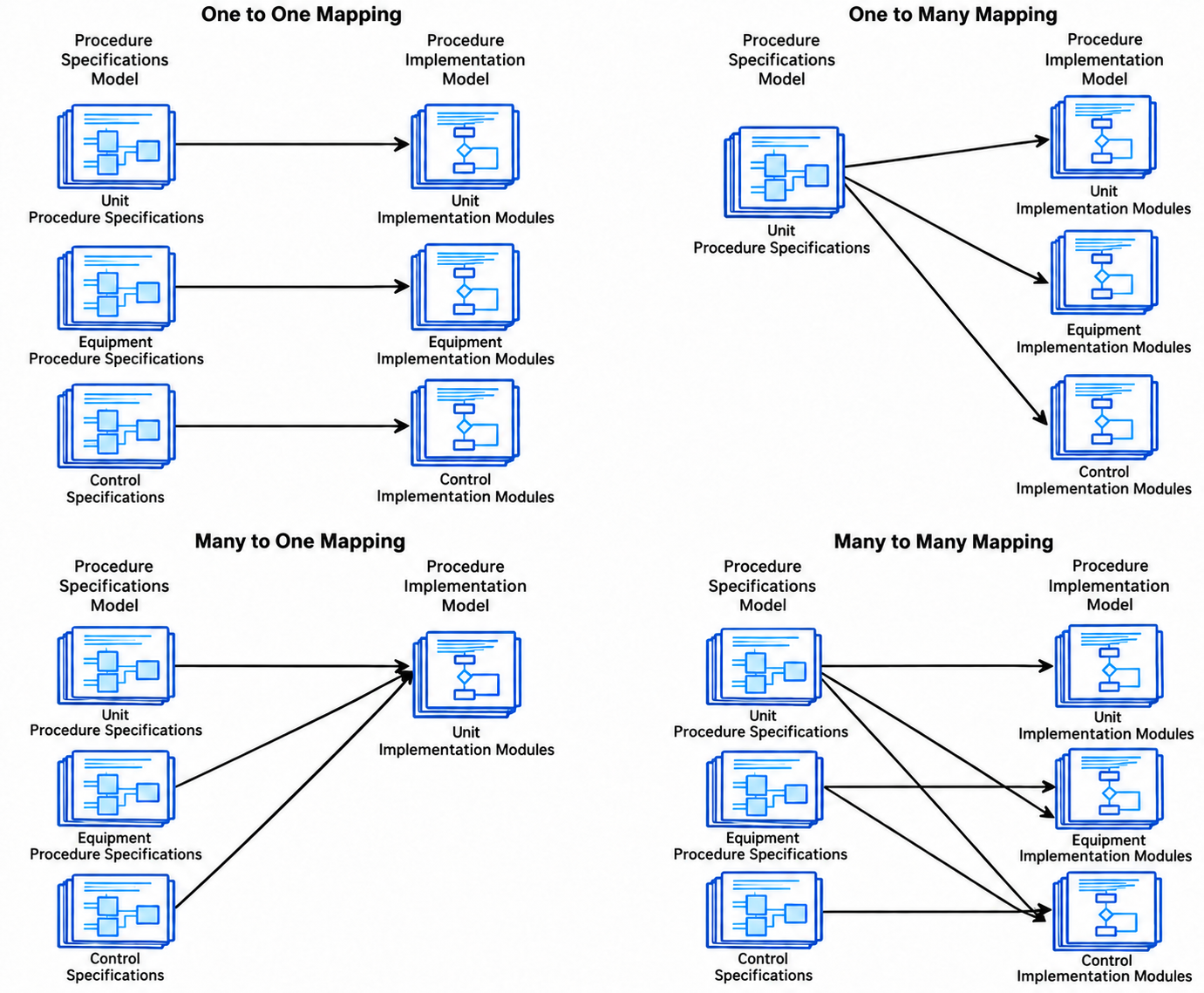
Figure 9 – Mapping Procedure Specifications to Implementation Modules
This mapping process translates high-level control procedure specifications (the “what” we want to accomplish) into specific implementation modules (the “how” we execute it in hardware/software). As control engineers, we need to bridge the gap between process requirements and actual system components.
Definition: Procedure specifications define the control logic, sequencing, and operational requirements, while implementation modules are the actual software blocks, hardware components, or code segments that execute these requirements.
The mapping ensures that each procedural step has a corresponding implementation element, whether it’s a function block in a PLC program, a control algorithm in a DCS module, or a specific hardware interlock. This systematic approach helps prevent gaps between design intent and actual system behavior.
Note: Proper mapping documentation becomes critical during commissioning and troubleshooting, as it allows you to trace issues from observed plant behavior back to specific implementation modules, or vice versa from specification requirements to their physical realization.
When designing your control system architecture, you have flexibility in how you map specifications to implementation modules. You can combine several detailed, lower-level specs into a single higher-level module that handles all their functions together. Conversely, you might take a broad, high-level specification and break it down into multiple smaller implementation modules that each handle specific portions of the overall requirement.
Note: The choice between merging up or dividing down depends on your plant’s automation philosophy - some facilities prefer centralized control logic while others favor distributed, modular approaches.
If you’re not consolidating or splitting specifications, then implement each spec in its corresponding module at the same hierarchical level (one-to-one mapping between specification and implementation).
Industrial Example: A high-level “reactor temperature control” spec might be divided into separate modules for heating control, cooling control, and safety interlocks, or multiple pump control specs could be merged into a single “pump farm management” module.
Note: Unit Procedure Specifications (the detailed instructions that define how a unit operation should be executed) can be implemented in several ways within your control system architecture. They may be coded as complete Unit Implementation Modules, or they can be broken down and distributed across Equipment Implementation Modules (which handle specific equipment functions), Control Implementation Modules (which manage individual control loops and strategies), or any combination of these approaches. However, Unit Procedure Specifications should not be implemented as Plant Area Implementation Modules (which are typically reserved for higher-level coordination across multiple units).
Implementation Tip: The choice of where to place your procedure specifications depends on factors like system complexity, maintenance requirements, and how tightly coupled your equipment operations are within the unit.
A Unit Implementation Module can combine and execute portions of Equipment Procedure Specifications (the detailed step-by-step instructions for operating specific equipment) to handle the start-up sequence of multiple pieces of equipment within a single process unit.
Industrial Example: In a distillation unit, the implementation module might coordinate the start-up procedures for the reboiler, condenser, and pumps by executing relevant sections from each piece of equipment’s individual procedure specifications, rather than running each equipment procedure separately.
Note: This approach allows for better coordination and timing control when multiple equipment pieces need to work together during unit start-up operations.
The flexibility of choosing between
one-to-one,
one-to-many,
many-to-one, or
many-to-many
mappings applies not only to mapping procedure specifications to different physical levels (such as individual equipment, unit operations, or entire process areas), but also to deciding how to implement multiple procedures which apply to a single physical asset.
Definition: Physical levels refer to the hierarchical structure of your plant - from individual field devices up to complete production units.
Depending on the automation philosophy, programming style, and other site-specific considerations, it might be desirable to combine multiple procedures into a single implementation module or to break procedures apart into multiple implementation modules. This decision affects how your control logic is organized within your DCS or PLC program.
Industrial Example: A reactor vessel might have separate procedures for heating, charging materials, and cleaning. You could implement these as one combined module, or as three separate modules that coordinate with each other, depending on your plant’s operational needs and maintenance requirements.
Example: [Many to One] A unit has two procedures: start-up and rate increase. These are implemented in a single unit level implementation module (a software component that contains the actual control logic and executes at the unit operations level).
Definition: In this many-to-one relationship, multiple high-level procedures are consolidated into one implementation module to reduce complexity and maintain coordinated control.
Industrial Example: Consider a reactor unit where both the initial startup sequence and the production rate adjustment procedures share common control elements like temperature control loops, pressure management, and safety interlocks. Rather than creating separate modules, both procedures are coded within the same unit-level module to ensure proper sequencing and avoid conflicts between operations.
A steam methane reformer (SMR) demonstrates a one-to-many relationship in its control system implementation. The plant operates with a single, unified start-up procedure that handles two distinct operating scenarios: hot restart (when the unit is still warm from recent operation) and cold start (when the unit has been completely shut down and cooled).
Implementation Note: This single master procedure gets deployed across two separate unit-level implementation modules - one dedicated to Hot Restart operations and another for Cold Start operations. Each module contains the same core procedural logic but with parameter sets and safety interlocks appropriate for its specific start-up condition.
Definition: Unit-level implementation modules are software components in distributed control systems (DCS) that execute specific operational procedures for individual process units or equipment.
Industrial Example: In an air separation plant, we encounter a many-to-many relationship between procedures and control modules. The plant operates using two main procedures: start-up and rate increase. These procedures are distributed across 4 control modules - one plant-level ASU (Air Separation Unit) module and three unit-level modules for Air Compressor, Air Purification, and Cold End operations.
Note: Each unit-level module contains the control logic and specifications for both procedures (start-up AND rate increase), while the plant-level ASU module acts as the coordination layer. This means the plant-level module orchestrates the sequence and timing between units, ensuring that when a start-up or rate change is initiated, all three unit modules execute their respective portions in the correct order and at the proper times.
This architecture allows for flexible operation where multiple procedures can utilize the same physical equipment modules, and each module can support multiple operational modes.
Different mappings may be used within the same control system. Regardless of which mapping configuration is selected, it is essential to implement proper prioritization and coordination of tasks within each implementation module. This ensures the Basic Process Control System (BPCS) operates according to the defined procedure specifications.
Note: Task prioritization becomes critical when multiple control loops or safety functions compete for processing resources, potentially causing delays that could affect system performance or safety margins.
Definition: Implementation modules are software components that contain the actual control logic and execute the mapped functions within the distributed control system.
4.14 Requirement
The Procedure Owner shall ensure that procedure specifications will be used as functional specifications for the creation of implementation modules, and the Physical Model is referenced to determine a suitable Procedure Implementation Model arrangement.
Note: Implementation modules are the actual software or hardware components that execute the defined procedures, while the Procedure Implementation Model defines how these modules are organized and interact within the physical system constraints.
4.15 Implementation Modules
4.15.1 Introduction to Implementation Modules
Implementation modules are structured collections of tasks that work together to carry out the specific operations defined in your procedural specifications (the step-by-step instructions for how a process should run). These tasks can be nested, meaning larger tasks can contain smaller sub-tasks within them.
The execution of tasks can happen in two ways: sequentially (one after another in order) or concurrently (multiple tasks running at the same time). Each task includes the detailed instructions needed to perform specific actions and built-in verification steps to confirm those actions completed successfully.
From an operational standpoint: When you need to execute a procedure in your control system, you’re actually running one or more tasks that are housed within these implementation modules. The modules serve as containers that organize and coordinate all the necessary tasks to complete your desired process operation.
Note: Figure 10 illustrates how these implementation modules are structured, showing their internal components and how data flows in and out of the module during operation.
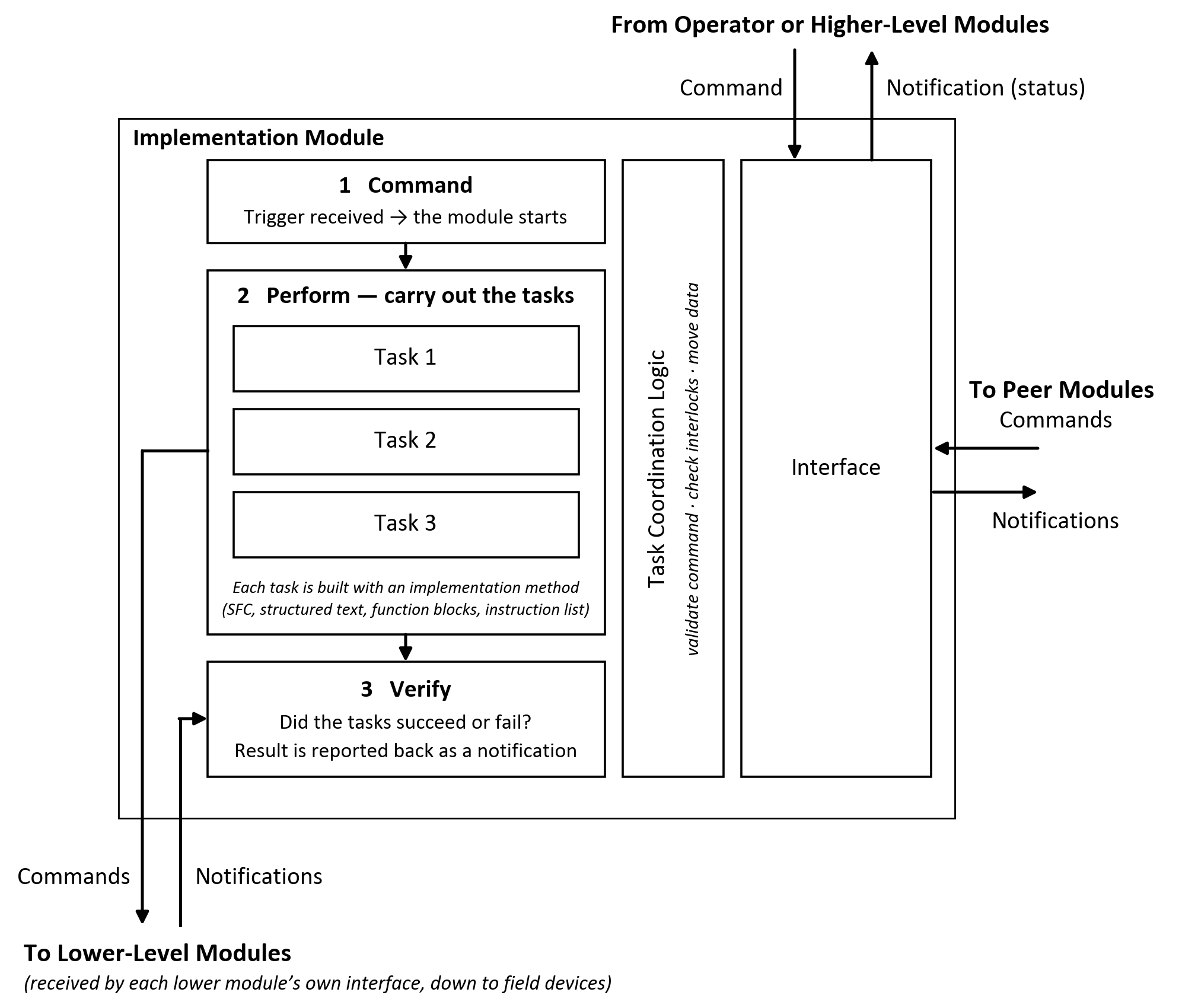
Figure 10 – Implementation Module: Command, Perform, and Verify
An implementation module contains the actual code and configuration files that execute your control logic on the target hardware.
What you’ll typically find in an implementation module:
The module includes the compiled control algorithms (your PID loops, state machines, and logic functions converted to executable code), hardware interface definitions (I/O mapping that connects your software variables to physical inputs and outputs), and system configuration parameters (communication settings, scan times, and safety limits).
Note: Think of the implementation module as the bridge between your control design and the actual hardware - it takes your theoretical control strategy and makes it work on real PLCs, DCSs, or other control platforms.
The contents shown demonstrate how control engineers package their work for deployment, ensuring all necessary components are included for the system to run properly in the field. This modular approach allows for easier testing, version control, and troubleshooting during commissioning.
The Control Implementation Module layer serves as the direct interface between your control system and the actual field devices (sensors, actuators, valves, motors, etc.). When you’re working with higher-level modules like coordinating control or supervisory functions, those modules use the Control Implementation Module as their pathway to communicate with physical hardware rather than accessing devices directly.
Note: This creates a structured hierarchy where physical device access is centralized through one layer, making troubleshooting and maintenance more manageable.
The module provides interfaces for two main users: plant operators (through HMIs or operator stations) and other implementation modules in your control architecture. Any logic processing, calculations, or decision-making that happens inside this module can only be accessed or monitored through these defined interfaces - you can’t bypass them to directly observe internal operations.
Industrial Example: Think of a motor control module - operators interact with it through start/stop buttons and status displays, while higher-level modules send it setpoint commands, but the actual motor control algorithms inside remain encapsulated within the module’s interface boundaries.
Implementation modules may interact with other implementation modules at the same hierarchical level or across different levels within the control system architecture.
Note: In control systems, implementation modules are software components that execute specific control functions (like PID controllers, safety interlocks, or communication handlers). These modules can communicate horizontally with peer modules handling related processes, or vertically with higher-level supervisory modules or lower-level device drivers.
Industrial Example: A temperature control module might interact horizontally with a pressure control module (same level) while also communicating vertically with a supervisory production module above it and a valve driver module below it.
- Commands may be received from, and notifications sent to, implementation modules that are at the same or a higher level of the Procedure Implementation Model via the module’s interface.
- Commands may be sent to, and notifications received from, implementation modules that are at the same or a lower level of the Procedure Implementation Model using the target module’s interface.
Sometimes you’ll want to wrap an entire implementation module inside another module to make your overall control strategy easier to understand and manage. This is called encapsulation (essentially putting one complete module inside another as a “black box”). An implementation module can contain other modules that are at the same hierarchical level or lower levels in your control system.
Note: This approach helps create cleaner, more organized control architectures by hiding complex subsystem details behind simpler interfaces.
Industrial Example: You might encapsulate multiple PID controllers and interlocks for a heat exchanger into a single “Temperature Control Module” that other parts of your system can interact with through simple setpoint commands.
The task component houses the control logic that drives the specific activities executed by an implementation module (a software block that contains the actual process control functions). Logical tasks are created through implementation methods, which are the programming functions used to define how the control system should respond to process conditions.
Note: Think of the task component as the “brain” that tells your control module what to do and when to do it, while the implementation module is the “hands” that actually carries out those instructions in the field.
A task coordination logic component may be needed to handle activities that occur within the module but aren’t tied to any specific task. These activities typically include data transfer operations to and from the module interface, command validation (checking if incoming commands are valid and safe to execute), interlock verification (confirming that safety conditions are met before allowing operations), coordination between multiple tasks running simultaneously, and general module logic functions.
Note: Think of this component as the “housekeeping” function that manages all the behind-the-scenes operations that keep your control module running smoothly, similar to how an operating system manages background processes on a computer.
Industrial Example: In a pump control module, while individual tasks might handle start/stop commands or speed control, the coordination logic would validate that inlet pressure is adequate, verify no emergency stops are active, and coordinate data exchange with the plant’s supervisory system.
Implementation methods refer to the specific tools and techniques we use to execute control tasks in our systems. Some examples of implementation methods that may be used are:
Note: In control engineering, an implementation method is essentially how we translate our control strategy from theory into actual working code or logic that can run on our control hardware (like PLCs, DCS systems, or embedded controllers). The choice of implementation method often depends on factors such as system complexity, real-time requirements, and the capabilities of your target hardware platform.
- Programming
- Instruction lists for manual Human Actions.
When working on control system projects, you’ll encounter several programming approaches that can be applied individually or in combination. The most common types include:
Ladder Logic Programming - Uses graphical symbols that resemble electrical relay circuits, making it intuitive for engineers with electrical backgrounds. This is the most widely used method in industrial PLCs (Programmable Logic Controllers).
Structured Text (ST) - A high-level programming language similar to Pascal or C, ideal for complex mathematical calculations and data manipulation that would be cumbersome in ladder logic.
Function Block Diagram (FBD) - Represents control functions as interconnected blocks, similar to control system block diagrams. Particularly useful for analog control loops and signal processing.
Sequential Function Chart (SFC) - Designed for step-by-step processes or batch operations, where the system moves through defined states or phases.
Instruction List (IL) - A low-level, assembly-like language that provides direct processor control but is rarely used in modern applications.
Note: These programming methods are standardized under IEC 61131-3, ensuring consistency across different PLC manufacturers and making it easier to transfer skills between platforms.
Industrial Example: A typical manufacturing line might use ladder logic for basic I/O operations (sensors, motors), function blocks for PID temperature control, and sequential function charts for the overall production sequence.
- Computer programs
- Configurable function blocks
- Continuous control functions
- Executable flowcharts.
- Procedure Function Charts (PFC)
- Sequential Function Charts (SFC)
Implementation methods can differ between separate implementation modules, and they can also vary between individual tasks within the same implementation module.
Note: An implementation module typically refers to a software or hardware component that executes specific control functions (such as a PID controller block or a safety interlock sequence). Even when using identical modules, the way each task is programmed or configured may require different approaches based on the specific process requirements or system constraints.
Note: This standard primarily focuses on automating procedures (converting manual step-by-step processes into automated control sequences), but we recognize that real-world implementations often require a hybrid approach. When you implement a procedure specification in your control system, some steps may still need manual operator intervention or human decision-making. However, this standard assumes that most elements within your procedure specifications will be executed automatically by the control system rather than requiring manual actions.
Definition: A procedure specification is a formal document that defines the sequence of steps, conditions, and actions needed to complete a specific process or operation in your control system.
4.15.2 Requirement
The Procedure Owner shall ensure that the Control Implementation Module should provide direct access to physical devices. Higher-level implementation modules should employ Control Implementation Module(s) as their mechanism to send commands and receive status to and from physical devices.
Note: This creates a standardized communication hierarchy where field devices aren’t accessed directly by multiple higher-level systems, reducing potential conflicts and ensuring consistent data flow.
Industrial Example: A temperature control loop would send its output signal through the Control Implementation Module to reach a control valve, rather than communicating with the valve directly.
4.15.3 Command, Perform, and Verify
Three separate work items should be used when executing implementation modules, as outlined below:
Definition: Work items are discrete tasks or processes that can be scheduled and executed independently within the control system’s execution cycle.
When implementing control modules in your system, dividing the execution into three distinct work items helps ensure proper timing, resource allocation, and system performance. This approach allows the control processor to manage each task separately, preventing one module from blocking others and maintaining predictable scan times (the time it takes for the controller to complete one full execution cycle).
Note: This three-work-item structure is particularly important in real-time control applications where timing consistency directly affects process stability and response performance.
- Command: The trigger to initiate the implementation module. When received this causes the implementation module to perform its tasks. A command may be issued by an operator or another implementation module.
- Perform: The execution of an implementation module’s tasks. A task may use any type of implementation method, but ultimately the task is performed by an operator or a computer.
- Verify: Verification that the implementation module’s tasks were performed successfully or failed. The verification may use any type of implementation method, but ultimately the verification is performed by an operator or a computer.
Figure 10 shows how the three work items fit inside an implementation module: a command arrives through the interface, the module performs its tasks, and the verified result is returned as a notification to the module or operator that issued the command.
As with implementation modules, each task may have the same three work items to execute.
Note: Work items are the individual executable components within a task that perform specific control functions - think of them as the building blocks that make up your control logic sequence.
Table 1 provides an example for each combination based on the same scenario of a valve being opened (a common actuator operation in process control systems).
Note: Understanding valve positioning scenarios is fundamental for control engineers, as valves are one of the most frequently used final control elements in industrial processes.
| Example | Command | Perform | Verify |
|---|---|---|---|
| Combination 1 | Operator decides a manually activated valve should be opened. | Operator goes to the valve in the field and opens it. | Operator confirms that flow through the valve has been established at the correct rate. |
| Combination 2 | Operator decides a manually activated valve should be opened. | Operator goes to the valve in the field and opens it. | Computer detects flow has been established and confirms the valve has been opened. |
| Combination 3 | Operator decides a computer-controlled valve should be opened. | Computer sends an electrical signal to open the valve. | Operator confirms flow has been established by monitoring the control system console and the valve is open. |
| Combination 4 | Operator decides a computer-controlled valve should be opened. | Computer sends an electrical signal to open the valve. | Computer detects flow has been established and confirms the valve has been opened. |
| Combination | Computer decides a manually activated valve should be opened. | Operator goes to the valve in the field and opens it. | Operator confirms that flow through the valve has been established at the correct rate. |
| Combination 6 | Computer decides a manually activated valve should be opened. | Operator goes to the valve in the field and opens it. | Computer detects flow has been established and confirms the valve has been opened. |
| Combination 7 | Computer decides a computer-controlled valve should be opened. | Computer sends an electrical signal to open the valve. | Operator confirms flow has been established by monitoring the control system console and the valve is open. |
| Combination | Computer decides a computer-controlled valve should be opened. | Computer sends an electrical signal to open the valve. | Computer detects flow has been established and confirms the valve has been opened. |
Table 1 – Command, Perform, Verify Examples
This table demonstrates the three-phase approach used in control system operations, where each action follows a structured sequence to ensure reliable system performance.
Command Phase: The control system receives or generates the instruction for a specific operation (this could be from an operator, supervisory system, or automated logic).
Perform Phase: The system executes the commanded action by activating the appropriate field devices, such as actuators, valves, or motor drives.
Verify Phase: The system confirms successful completion by monitoring feedback signals from sensors, position indicators, or status contacts.
Industrial Example: For a motor start sequence - Command: START signal received from HMI (Human-Machine Interface), Perform: Motor contactor energizes and motor begins rotation, Verify: Motor running status confirmed through auxiliary contacts and speed feedback.
Note: This Command-Perform-Verify methodology helps prevent unsafe conditions and ensures that each control action is completed as intended before proceeding to the next operation in the sequence. Many safety-rated control systems (SIL-rated systems) require this verification step to meet functional safety standards.
4.15.4 Degrees of Automation
More complex automation systems incorporate greater process knowledge (embedded understanding of how the system should behave under different conditions) and can therefore react autonomously to changing process conditions while executing the appropriate automated procedures. This results in more consistent and efficient process operation with reduced variability.
Definition: Process knowledge refers to the programmed logic that defines normal operating ranges, expected responses, and corrective actions for various process scenarios.
Simpler automation systems contain limited process knowledge, which means operators must manually perform more procedures and monitor process variables at a much more detailed level. The operator essentially becomes the decision-maker for process adjustments that would otherwise be handled automatically.
Important Consideration: As you increase the degree of automation, additional instrumentation (sensors, transmitters, and measurement devices) is typically required to provide the control system with sufficient feedback about process conditions. Without adequate instrumentation, even sophisticated control logic cannot function effectively.
Industrial Example: A simple level control might just maintain tank level between high and low alarms, while a complex system could anticipate level changes based on upstream flow rates and automatically adjust multiple inlet valves accordingly.
Three degrees of automation are:
Definition: Automation degrees refer to the level of human involvement required in a control system’s operation and decision-making processes.
Level 1 - Manual Control: The operator directly controls all system functions through manual inputs (switches, buttons, manual valves). The control system provides basic feedback displays but requires constant human intervention for operation.
Level 2 - Semi-Automatic Control: The system can execute pre-programmed sequences or maintain setpoints automatically, but still requires operator supervision and intervention for mode changes, startup/shutdown procedures, or exception handling. Most industrial processes operate at this level.
Industrial Example: A temperature control loop that automatically maintains a setpoint but requires an operator to change production recipes or respond to alarm conditions.
Level 3 - Fully Automatic Control: The system operates independently with minimal human intervention, making decisions based on programmed logic and sensor feedback. Operators primarily monitor system status and handle only exceptional situations or maintenance requirements.
Note: In practice, most industrial control systems combine elements from different automation levels depending on the criticality and complexity of specific process functions.
- Manual – The operator is responsible for the command, perform, and verify work items. The operator may use the control system console or local indicators and actuators in the field, but there is no computerized procedure automation involved.
- Semi-Automated - Implementation modules are considered semi-automated when the operator and computer share coordinated responsibility for the command, perform, and verify work items. The amount of automation used may vary.
- Example 1 The computer prompts the operator who is then responsible for the perform and verify work items.
- Example 2 The operator issues or acknowledges a command work item to the computer which then is responsible for the perform and verify work items.
- Fully Automated – Implementation modules are considered fully automated when the computer is responsible for the bulk of the command, perform, and verify work items.
- Example 1: The operator issues the command work item to the computer to start a distillation column. The computer uses a hierarchy of implementation modules to control and monitor process equipment to transition the distillation column from a non-operating state to an operating state. The computer’s automated procedures perform the necessary command, perform, and verify work items to accomplish the transition.
- Example 2: When a distillation column is in the operating step the computer monitors for pre-defined abnormal conditions, when one is detected, it issues the command work item to an implementation module which then automatically performs the perform and verify work items to respond to the abnormal condition and return the distillation column to a normal or known operating condition.
For each degree of automation, there can be different means to perform the task. This flexibility allows control engineers to choose the most appropriate implementation method based on system requirements, available technology, and operational constraints.
Definition: Degrees of automation refer to the spectrum from fully manual operation to complete autonomous control, with various levels of human-machine interaction in between.
Industrial Example: A temperature control task might be implemented as manual valve adjustment (low automation), setpoint changes via HMI with automatic valve control (moderate automation), or fully autonomous operation with adaptive control algorithms (high automation).
See Figure 11 – Examples of Degrees of Automation.
- Manually: Field Panel, Manually (with a tool)
- Semi-Automated: Prompt (the operator to perform a task), Operator issues a command through the HMI, acknowledgment of Operator is required.
- Fully Automated: Such as SFC, CFC (block diagrams), Cause and Effect Matrix, and Structured Text.
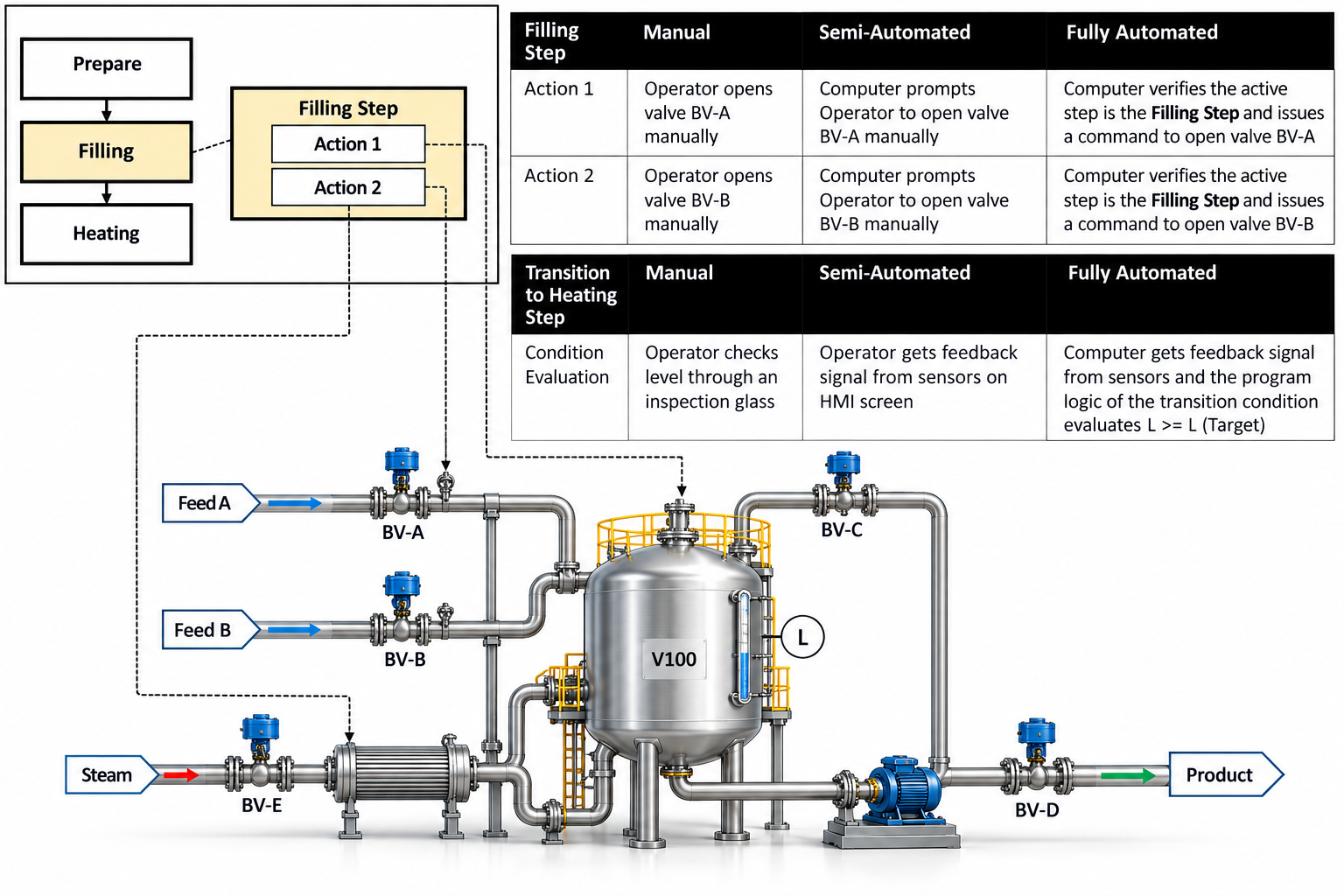
Figure 11 – Examples of Degrees of Automation
This figure illustrates the spectrum of automation levels commonly found in industrial control systems, ranging from fully manual operations to complete autonomous control. Each degree represents a different balance between human operator involvement and automated system control.
Manual Control: The operator directly controls all process variables and makes all decisions. Think of manually adjusting valve positions or setpoints based on visual readings from analog gauges.
Operator-Assisted Control: Basic automation tools support the operator’s decision-making process. The system might provide alarms or simple calculations, but the operator still initiates all control actions.
Shared Control: Both the operator and automated systems actively participate in control decisions. For example, an operator might set production targets while the control system automatically adjusts feed rates and temperatures to meet those targets.
Supervisory Control: The automated system handles routine control tasks independently, while the operator monitors performance and intervenes only when necessary. This is similar to how most modern DCS (Distributed Control Systems) operate in process plants.
Fully Automated Control: The system operates autonomously with minimal human intervention, typically limited to maintenance activities or emergency situations.
Note: Understanding these automation degrees helps control engineers select appropriate control strategies and determine the optimal level of human-machine interface complexity for their specific applications.
4.15.5 Operator Notifications
Table 2 below shows practical examples of how notifications can be integrated with automated procedures. These examples are adapted from Figure 6 in ISA-TR18.2.4-2012 (ISA Technical Report on alarm rationalization), which provides sample criteria for different notification types within an alarm philosophy.
Note: Notifications in this context refer to informational messages sent to operators that don’t require immediate action, unlike alarms which demand operator response. When combined with automated procedures, these notifications help operators understand what the system is doing automatically and when manual intervention might eventually be needed.
| Operator Notification Types | Operator is expected to take an action | The operator might need to be aware but is not required to take action (Action might be expected from someone other than the Operator.) |
|---|---|---|
| Arises from an abnormal process or equipment situation | Alarm | Alert |
| Arises from a normal situation | Prompt | Status Notification |
Table 2 – Sample Criteria for Notification Types for Automated Procedures
This table outlines typical notification criteria used in automated control systems to alert operators and maintenance personnel about different system conditions. The notification type determines the urgency level and required response time for each event.
Critical Alarms: Process variables exceeding safe operating limits that require immediate operator intervention (typically <5 minutes response time). Examples include reactor temperature above maximum setpoint, emergency shutdown system activation, or safety interlock trips.
Warning Alarms: Process conditions approaching but not yet exceeding safe operating boundaries. These indicate potential issues that need attention within 15-30 minutes to prevent escalation to critical status. Example: Tank level at 85% of capacity when normal operating range is 40-80%.
Informational Messages: Status updates about normal system operations, setpoint changes, or routine equipment cycling. No immediate action required, but useful for process monitoring and historical trending.
Maintenance Notifications: Alerts triggered by predictive maintenance algorithms or scheduled maintenance intervals. These notify maintenance teams about required preventive actions like filter changes, calibration due dates, or equipment inspection schedules.
System Status Updates: Communications about control system health, communication link status, and operator interface connectivity. These help maintain awareness of the control infrastructure’s operational state.
Note: Proper alarm management practices recommend limiting critical and warning alarms to prevent operator alarm fatigue while ensuring all safety-critical conditions are properly monitored.
The terms alarm and alert are formally defined by ISA-18.2 (a standard that governs alarm management systems) and these definitions apply specifically to automated procedures. While the term prompt appears in ANSI/ISA-18.2-2016, it lacks a clear definition in that document, so this standard provides its own definition for how prompts function within automated procedures.
Note: ANSI/ISA-18.2-2016 uses the broader term “status,” but this standard uses the more specific term “status notification” to clearly distinguish it from the general status displays you might see on HMI screens (human-machine interface graphics) that show routine operating conditions of automated procedures.
Definition: Status notifications are distinct communications about procedure states, separate from the continuous status information typically displayed on operator graphics.
Table 3 provides practical examples for each type of notification category listed in Table 2.
Note: These examples help illustrate how different alarm and event types would appear in your HMI (Human-Machine Interface) or control system historian during actual plant operations.
| Operator Notification Type | Example Notification | Comment |
|---|---|---|
| Alarm | The procedure did not receive feedback of the pump running in a defined time after issuing the start command. | The operator must take action to resolve the problem. This is not a prompt since this is an abnormal situation. |
| Alert | The procedure detected a drop in feed and is changing to the reduced production state. | There is the economic impact and the drop in the feed rate is an abnormal situation, but the automated procedure is taking action, no operator action is required. |
| Prompt | Prompt the operator to unblock a pump. Confirmation is required before the continuing procedure. | The automated procedure is waiting for operator confirmation or a valve limit switch confirmation before proceeding. |
| Prompt | The plant is ready to move into a start-up state. | The automated procedure is designed to wait for the operator to issue the start command. |
| Prompt | Enter lab analysis data. | The automated procedure will require the data later in its execution but for now, it continues execution. |
| Prompt | Notify downstream unit that we are ready to send the product. | The automated procedure has the unit running and can redirect the product from the day tank to the downstream unit. |
| Status Notification | An automated procedure has changed from Starting to Running. | The automated procedure displays its current step on a graphic display. This notification is provided for situational awareness. |
| Status Notification | Day tank 1 full switching to Day tank 2. | The automated procedure sends a message to the operator documenting the event to aid in situational awareness. |
Table 3 – Examples of Operator Notifications with Automated Procedures
This table demonstrates how automated control systems can notify operators while simultaneously executing predefined response procedures. These examples show the integration between human-machine interface (HMI) alerts and automatic process corrections.
Note: Each notification includes both the operator alert message and the corresponding automated action that the control system executes without requiring operator intervention.
The examples illustrate common industrial scenarios where immediate automated response is critical for safety and process stability, while keeping operators informed of system status changes. The automated procedures typically engage within milliseconds to seconds of alarm detection, much faster than manual operator response times.
Definition: Automated procedures in this context refer to pre-programmed control logic sequences that execute automatically when specific process conditions or alarm states are detected by the control system.
These notification-automation pairs are essential for maintaining continuous operation during minor process upsets while ensuring operators remain aware of all system activities for supervisory oversight and manual intervention if needed.
The examples shown in Table 3 are based on the following assumptions:
Note: These baseline conditions help standardize the calculations and ensure consistent comparisons across different control scenarios. In real applications, you’ll need to adjust these values based on your specific system requirements and operating conditions.
  - Each type of notification is differentiated to the operator visually, audibly, or by both means.
  - Operator displays show alerts, prompts, and status notifications on separate displays from alarms for compliance with ANSI/ISA-18.2-2016.
  - Alarms and alerts may or may not affect an automated procedure’s execution.
  - Prompts visually, audibly, or by both means indicate to the operator whether the automated procedure is holding its execution while waiting for a response by the operator or continues execution.
  - Status notifications do not stop the execution of a procedure.
  - Status notifications can be displayed to the operator as messages similar to alerts and prompts, as visualizations on a graphic, or by both means.
  - Status notifications are only used for significant items to reduce the load on the operator. Items not deemed significant are documented as log entries.
  - Log entries are excluded since while they may be used with automated procedures to aid in analysis, they are not notifications.
4.15.6 Mapping Implementation Modules to Control System Components
Implementation modules can be executed in three different locations: within a BPCS controller, on a BPCS application server, or on an external application server that operates independently from the BPCS (Basic Process Control System - the primary control system managing normal plant operations). Figure 12 shows a conceptual diagram illustrating how these implementation modules are deployed within both the BPCS controller and application server components.
Note: The choice of where to run implementation modules depends on factors like processing requirements, response time needs, and system architecture constraints. Modules running in the controller typically have faster response times but limited processing power compared to those running on application servers.
When a task’s implementation method produces a task that cannot be executed by the control system computer, it is classified as a manual procedure and falls outside the scope of the BPCS (Basic Process Control System - the primary automated control layer). Some of these implementation modules may be carried out by field operators using printed checklists or handheld electronic devices.
Note: Manual procedures are common in process industries for tasks like equipment inspection, sample collection, or emergency response actions that require human judgment or physical manipulation that cannot be automated.
Industrial Example: A task requiring an operator to visually inspect a pump bearing for unusual wear or vibration would be manual, while a task to start that same pump based on a temperature setpoint would be automated within the BPCS.
Automated procedures may interact with other BPCS functions such as regulatory control (continuous control loops that maintain process variables like temperature, pressure, or flow at desired setpoints) and interlocking (safety logic that prevents equipment operation under unsafe conditions by automatically shutting down or blocking certain actions).
Note: When designing automated sequences, always consider how your procedure will affect existing control loops and safety interlocks to avoid conflicts or unintended process upsets.
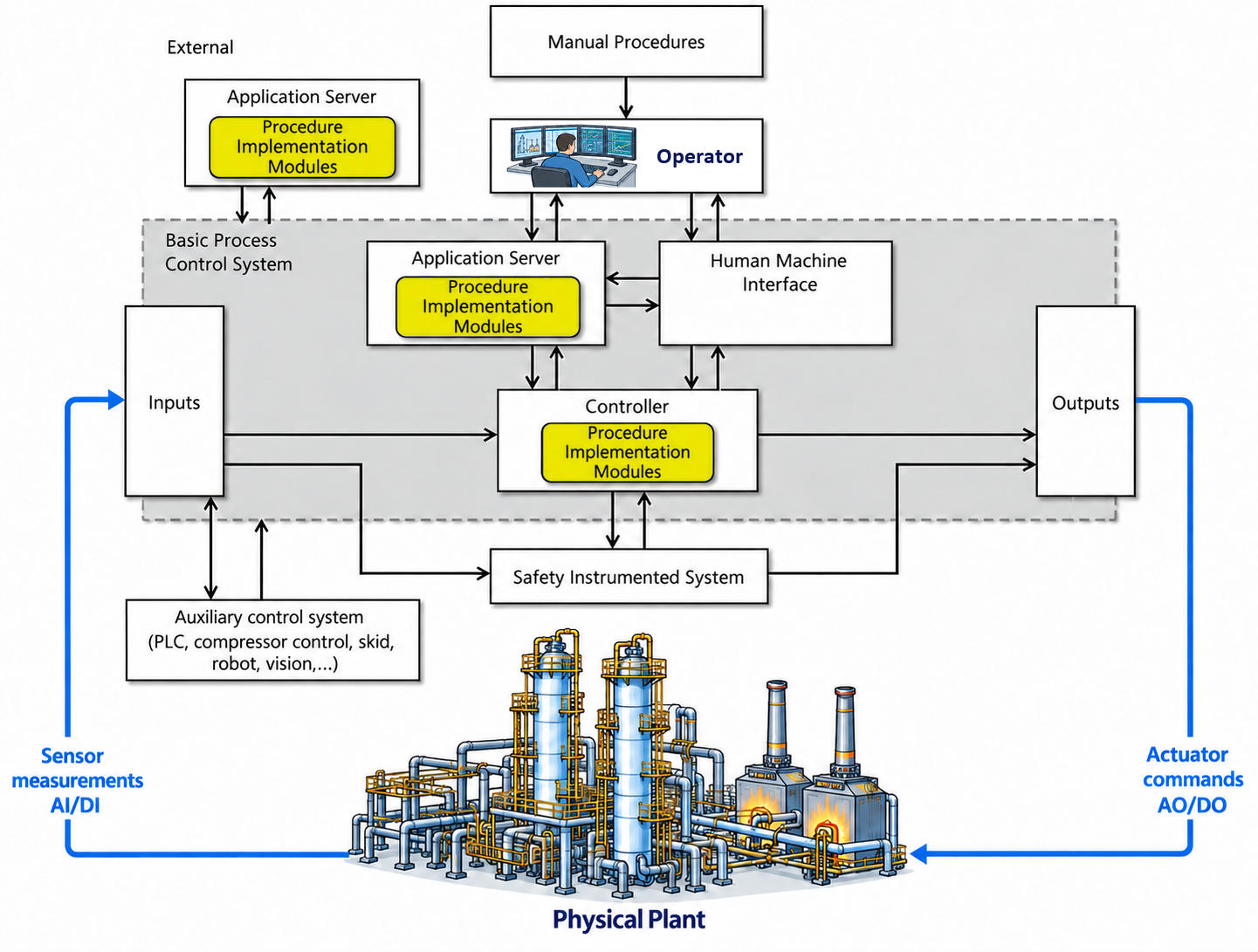
Figure 12 shows how implementation modules
(the software building blocks that contain control logic) are mapped to BPCS components (Basic Process Control System components - the standard control system hardware and software elements like controllers, I/O modules, and HMI stations).
Note: This mapping demonstrates the relationship between the logical control functions you design and the physical hardware where they will execute. Understanding this mapping is critical for proper system configuration and troubleshooting.
Definition: BPCS refers to the primary control system that manages normal process operations, as opposed to safety instrumented systems (SIS) which handle emergency shutdowns.
The decision to run implementation modules in an application server or a controller depends on four key factors: safety, risk, cost, and benefit.
Definition: Implementation modules are software components that execute specific control logic or functions within your control system.
When evaluating where to deploy these modules, consider that controllers (like PLCs or DCS controllers) typically offer deterministic response times and fail-safe operation, making them suitable for safety-critical functions. Application servers provide more computational power and flexibility but may introduce communication delays and additional failure points.
Industrial Example: A temperature control loop for a reactor might run on the controller for safety reasons, while production reporting and data analytics modules could run on an application server for cost efficiency.
The trade-off analysis should weigh the safety requirements of each function against the economic benefits of centralized processing and the associated risks of network dependencies or server failures.
  - Application Server: Computer-based, multipurpose, flexible off-the-shelf hardware with commercial operating system hosting DCS/BPCS applications.
  - Controller: dedicated vendor-specific hardware with the proprietary operating system for real-time execution of automated procedures.
Criteria for deciding the appropriate location of an implementation module (the specific software or hardware component that executes control logic) may include:
Note: The placement decision directly impacts system performance, maintenance requirements, and overall reliability. Consider factors such as processing power availability at each potential location, network latency between the module and its I/O points, and accessibility for troubleshooting and updates.
Industrial Example: In a distributed control system, you might choose to place a PID temperature control module close to the field instruments to minimize signal delay, while keeping supervisory modules at a central control room for operator access.
  - Procedure implementation cost
  - Procedure lifecycle cost
  - Time responses required by the process
  - Health, safety, and environmental risk
  - Operating philosophy for operator interaction with procedures
  - Availability of instrumentation to perform automated tasks
  - A desire for incremental implementation of automated procedures
  - System performance requirements such as reliability, availability, response time, throughput, and capacity.
When your process demands rapid response times (typically milliseconds to seconds) or when failures could pose serious health, safety, or environmental hazards, you should consider running the implementation module directly in the controller rather than in a separate system. Controllers offer significantly faster execution cycles and built-in redundancy features that make them more reliable for critical applications.
Note: Controllers typically have scan times of 1-10 milliseconds compared to higher-level systems that may have response times of 100+ milliseconds.
Industrial Example: In a chemical reactor with exothermic reactions, an emergency shutdown sequence needs to execute within milliseconds to prevent dangerous pressure buildup - this type of safety-critical logic should run in the controller, not in a supervisory system.
When implementing an automated procedure that doesn’t need the rapid response times that a controller can provide (typically millisecond-level response), an application server becomes a suitable choice. This scenario is common when you’re automating tasks that operators previously handled manually, such as batch sequencing or scheduled maintenance routines.
Key Consideration: Application servers operate with response times in the seconds-to-minutes range, which is adequate for supervisory functions but not for real-time control loops that require fast feedback.
Application servers are appropriate when the health, safety, and environmental (HSE) risks are manageable and don’t require the fail-safe capabilities or deterministic timing that dedicated controllers provide.
Industrial Example: Using an application server to automate daily startup sequences or generate production reports would be appropriate, whereas controlling a critical temperature loop in a reactor would require a controller for safety and performance reasons.
Implementation modules should not be executed directly within a Safety Instrumented System (SIS - the critical safety system that automatically shuts down equipment during hazardous conditions). However, when implementing procedure automation, establishing communication with the SIS becomes critical for safe operations.
Key Point: If the SIS trips a portion of the process (meaning it automatically shuts down equipment due to a detected unsafe condition), this trip information must be communicated to the implementation module. This allows the automation module to respond appropriately to the abnormal situation by adjusting its control logic, transitioning to a safe state, or halting operations as needed.
Note: This communication typically occurs through hardwired digital signals or dedicated safety communication protocols, ensuring the basic process control system (BPCS) receives reliable trip status information from the independent SIS.
When a valve is connected exclusively through the SIS (Safety Instrumented System - the safety control layer that protects against hazardous conditions), the SIS can receive operational requests from the BPCS (Basic Process Control System - the normal production control system) to open that valve. However, the valve will only open if the safety function permits it to do so.
Key Point: The safety function always takes priority over any BPCS request to open a valve. This override capability is built into the implementation module (the software/logic block that executes the safety function).
Industrial Example: Consider an emergency shutdown valve on a reactor feed line. During normal operation, the BPCS might request the valve to open to resume production after maintenance. If the SIS detects that reactor temperature is still too high, the safety function will override the BPCS request and keep the valve closed until safe conditions are restored.