6. Lifecycle Management Strategy
6.1 Introduction
This standard establishes a structured approach for managing the complete lifecycle of automated control systems - from initial design and development through ongoing maintenance. The Lifecycle Management Strategy (a systematic framework that defines how automation projects progress from conception to decommissioning) provides essential context for engineering work processes and ensures long-term sustainability of automated procedures.
Definition: Lifecycle management in automation refers to the organized approach of handling all phases of a control system’s existence, including planning, design, implementation, commissioning, operation, and eventual replacement.
Industrial Example: Rather than developing each PLC program or HMI interface as a standalone project, this lifecycle approach ensures consistent documentation standards, change management procedures, and maintenance protocols across all automation assets in a facility.
The strategy makes work processes more sustainable by establishing repeatable methods and maintaining institutional knowledge, reducing the risk of system failures or knowledge gaps when personnel changes occur.
If the procedure automation is implemented as part of a larger project (rather than as a standalone automation task), refer to Annex C for additional project-specific requirements and guidelines.
Note: Project-based automation typically involves integration with existing control systems, coordination with multiple stakeholders, and adherence to project timelines and documentation standards that differ from routine automation procedures.
The lifecycle management process should incorporate a structured software development model, with two common approaches being the V-model or GAMP 5 (Good Automated Manufacturing Practice). GAMP 5 provides a graphical framework that maps out each phase of the lifecycle management strategy, making it easier to visualize project progression and validation requirements. The V-model serves as both a development methodology and project management framework that defines the relationship between development phases and their corresponding testing activities.
Note: Both models help ensure systematic development and validation of control systems, with GAMP 5 being particularly relevant for pharmaceutical and regulated industries, while the V-model is widely applicable across various industrial automation projects.
6.2 V-model
6.2.1 Objective
The objective of the GAMP 5 V-Model is to provide a structured, risk-based framework for designing, developing, verifying, and validating automated systems in regulated industries.
It ensures:
- Clear tractability from requirements to implementation
- Proper documentation at each lifecycle stage
- Reduced validation risk
- Compliance with regulatory expectations (FDA, EMA, etc.)
- Controlled integration of simulation and testing
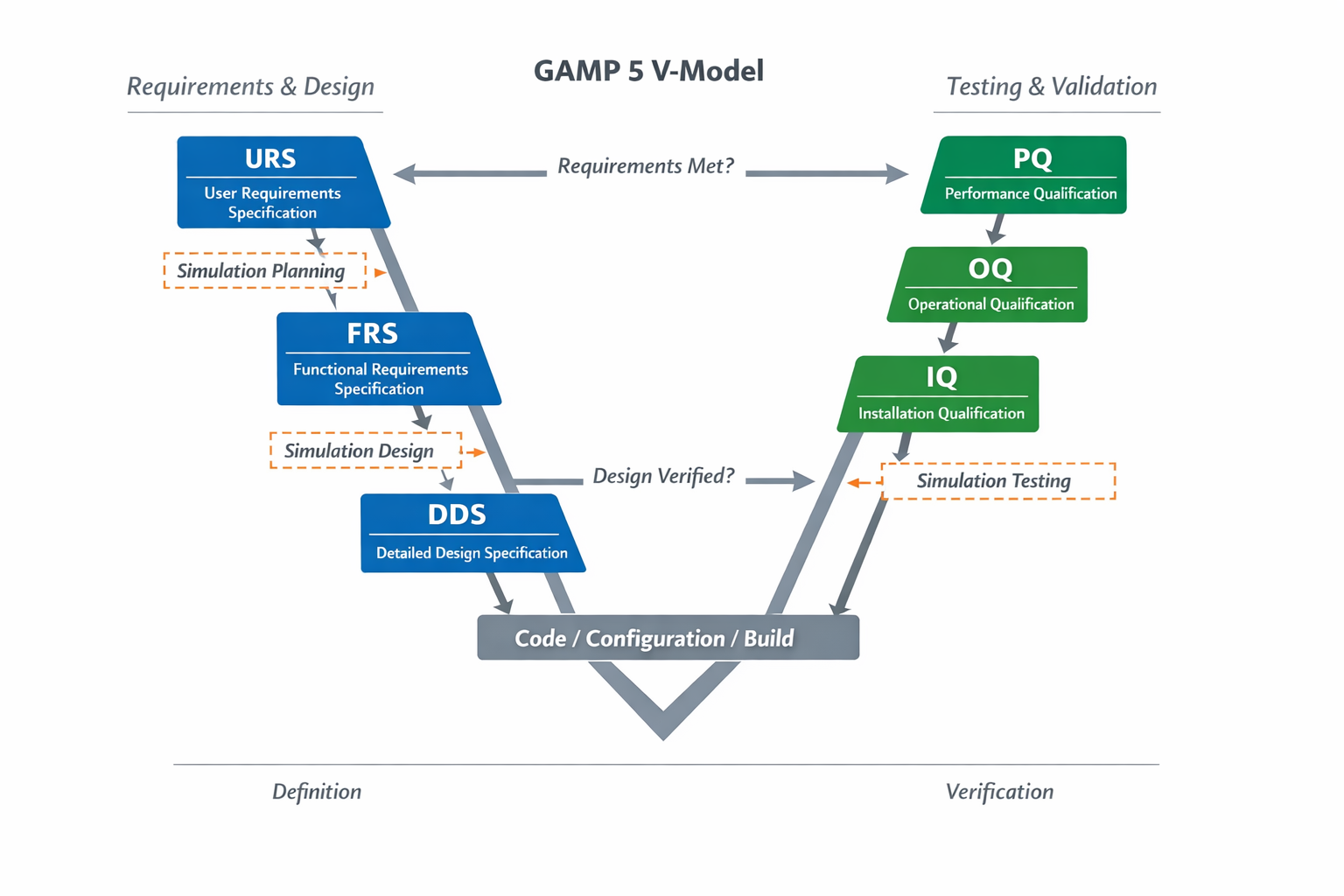
Figure 34 – GAMP 5 V-Model with Simulation Integration
The left side of the V defines requirements and design.
The right side verifies and validates those definitions.
6.2.2 URS – User Requirements Specification
6.2.2.1 Definition
URS defines what the system must do from the user’s and business perspective — without specifying how it will be implemented.
It focuses on functionality, performance, safety, and regulatory expectations.
6.2.2.2 Typical Content
- Process objectives
- Operational requirement
- Safety requirements
- Regulatory compliance requirements
- Data integrity expectations
- Alarm and reporting requirements
- Performance criteria
6.2.2.3 Steps to Develop URS
- Identify stakeholders (Operations, Engineering, QA, Validation)
- Define system boundaries
- Document functional requirements
- Define performance requirements
- Define safety and compliance expectations
- Assign risk level (high/medium/low)
- Review and approve
6.2.3 FRS – Functional Requirements Specification
6.2.3.1 Definition
FRS defines how the system will function to satisfy the URS requirements.
It translates user needs into system-level functional logic.
6.2.3.2 Typical Content
- Control philosophy
- Process states
- Modes of operation
- Sequence logic
- Interlocks
- Alarm handling
- Data flow logic
6.2.3.3 Steps to Develop FRS
- Review URS
- Map each URS requirement to functional logic
- Define control strategies
- Define state-based or sequence-based control structure
- Define interlocks and alarms
- Define operator interface behavior
- Create traceability matrix (URS → FRS)
- Review and approve
6.2.4 DDS – Detailed Design Specification
6.2.4.1 Definition
DDS defines the technical implementation details of the FRS.
It includes actual programming, configuration, and hardware details.
6.2.4.2 Typical Content
- DCS or PLC logic diagrams
- Function block definitions
- I/O lists
- Hardware configuration
- Network architecture
- Database structure
- Screen layouts
- Tag naming conventions
6.2.4.3 Steps to Develop DDS
- Review FRS
- Define hardware architecture
- Define I/O mapping
- Develop control modules
- Define alarm configuration
- Develop HMI screens
- Define simulation requirements
- Perform design review
6.2.5 Code / Configuration / Build
6.2.5.1 Definition
The physical implementation of the DDS inside the automation platform.
6.2.6 Steps
- Develop PLC code
- Configure SCADA/DCS
- Configure databases
- Implement communication drivers
- Perform internal testing
6.2.7 Testing & Qualification (Right Side of V)
6.2.7.1 IQ – Installation Qualification
6.2.7.2 Definition
Verification that hardware and software are installed correctly.
6.2.7.3 Steps
- Verify hardware installation
- Verify software versions
- Verify network configuration
- Document installation evidence
6.2.7.4 OQ – Operational Qualification
6.2.7.5 Definition
Verification that the system operates according to FRS under controlled conditions.
6.2.7.6 Steps
- Test each functional requirement
- Test alarms
- Test interlocks
- Test sequences
- Document deviations
6.2.8 PQ – Performance Qualification
6.2.8.1 Definition
Verification that the system performs correctly in real production conditions.
6.2.8.2 Steps
- Run process under normal conditions
- Test stress conditions
- Confirm performance metrics
- Obtain final approval
6.3 Simulation Strategy Integration (Recommended Addition)
For modern automation (especially SBC / SqBC systems), simulation should be defined at:
- URS → Define if simulation is required
- FRS → Define simulation behavior
- DDS → Implement simulation modules
Simulation reduces risk before OQ and PQ.
This model uses sequential phases paired with validation tests that allow the development team to set clear expectations and identify potential flaws throughout the process without needing a final build first. The V-model (a development methodology where each design phase has a corresponding testing phase) is constructed from the following:
Note: This approach is particularly valuable in control system development since it catches integration issues early - for example, you can validate your control algorithm logic before implementing it on actual hardware, potentially saving weeks of troubleshooting later.
A User Requirements Specification (URS) is a foundation document that clearly defines what your automation system needs to accomplish and how well it must perform. The URS serves two critical purposes: it outlines the specific functionality and operational purpose of the procedural automation you’re designing, while also establishing concrete, measurable performance criteria that your system must meet.
Key Distinction: The URS focuses on the “what” rather than the “how” - it specifies what the system must do and the performance standards it must achieve, but it doesn’t dictate the specific implementation methods or technical solutions you’ll use to get there.
Industrial Example: A URS for a reactor temperature control system would specify “maintain reactor temperature at 350°C ± 2°C with a maximum settling time of 5 minutes after setpoint changes” rather than specifying whether to use a PID controller, cascade control, or feedforward compensation.
Note: Think of the URS as your system’s performance contract - it defines success criteria that any control strategy you implement must satisfy, giving you flexibility in your technical approach while ensuring you meet operational requirements.
A Functional Requirement Specification (FRS) is a document that defines what the control system must accomplish from the end-user’s perspective, without specifying the technical implementation details. Think of it as the “what” rather than the “how” of your control system design.
The FRS covers several key areas that control engineers need to address:
Input Requirements: Defines all process variables, sensor signals, and operator commands the system must receive and process.
Output Requirements: Specifies all control outputs, alarms, status indicators, and data the system must generate.
Control Logic: Describes the required control algorithms and decision-making processes (such as PID loops, interlock sequences, or safety shutdown logic).
Procedural Automation: Outlines automated sequences and batch operations the system must execute.
Storage and Data Handling: Details what process data, historical trends, and configuration parameters need to be stored and how they should be managed.
Security Requirements: Specifies access control, user authentication, and cybersecurity measures needed for the system.
Note: The FRS serves as the foundation document that guides your control system design and helps ensure all stakeholders agree on system functionality before implementation begins. It’s essentially your contract with the end-users about what the finished system will do.
A Detailed Design Specification (DDS) serves as the comprehensive blueprint for all software components that will be implemented in the final control system. Think of it as the detailed construction plan that translates high-level requirements into buildable system components.
The DDS provides all the technical information needed to construct the system based on the previously defined functional requirement specification (the document that describes what the system should do, not how it should do it).
The specification is organized into three main categories:
Inputs - This section documents all data entry points and user interfaces, often including actual screenshots or mockups from system prototypes. For control systems, this typically covers operator interface screens, data acquisition points, and external system connections.
Processes - This contains the core logic documentation, including Process Flow Diagrams (PFDs) that map out how data moves through the system. All control algorithms, mathematical formulas, and communication protocols between different software modules are detailed here. Note: This is where you’ll find the actual control logic that governs system behavior.
Outputs - This section specifies all system-generated information, including alarm displays, trend reports, data logs, and communication to external systems. Report layouts and data formatting requirements are fully defined here.
Industrial Example: In a temperature control system, the DDS would specify the HMI screen layout (inputs), the PID control algorithm with tuning parameters (processes), and the alarm format when temperature exceeds setpoints (outputs).
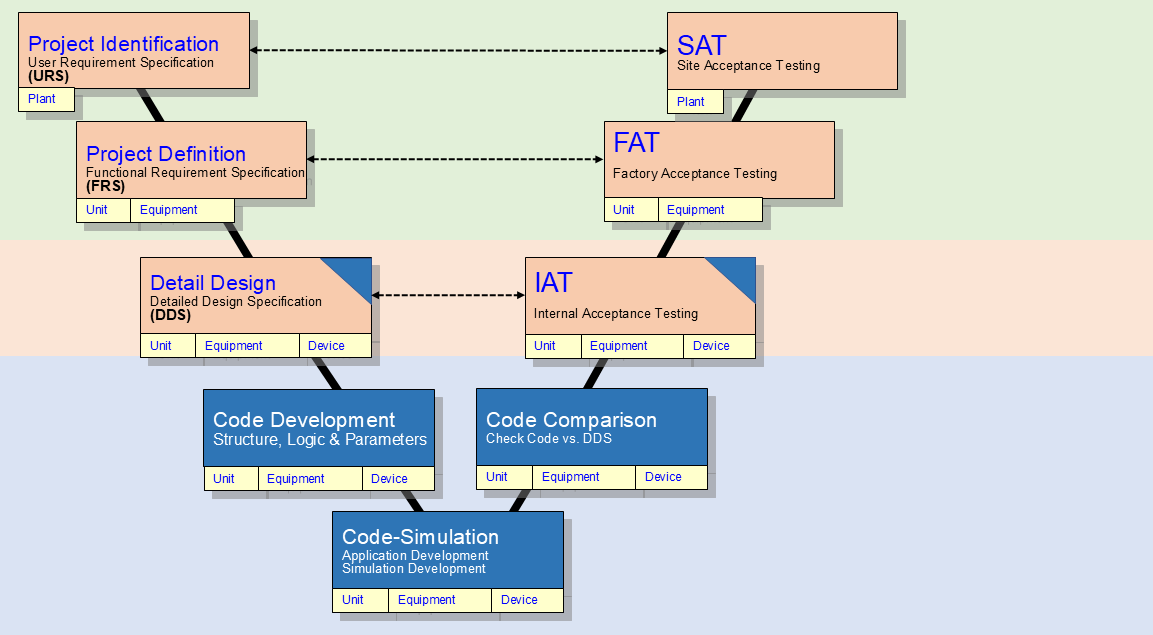
Figure 35 – V Model (CTRL Designer LLC ctrldesigner.com)
The V Model from GAMP 5 (Good Automated Manufacturing Practice) represents the structured approach for validating automated systems in regulated industries like pharmaceuticals and biotechnology. This model shows how each phase of system development corresponds to a specific testing and verification phase, forming the characteristic “V” shape.
Definition: GAMP 5 is the internationally recognized guidance document that provides a framework for achieving compliant computerized systems in GxP (Good Practice) regulated environments.
The left side of the V represents the design and specification phases, starting from user requirements at the top and moving down through functional specifications, design specifications, and module specifications. The right side shows the corresponding verification activities, beginning with module testing and moving up through integration testing, system testing, and finally user acceptance testing.
Key Principle: Each development phase on the left must have a corresponding verification phase on the right, ensuring traceability from requirements to final validation. This bidirectional relationship helps control engineers ensure that what was specified is actually what gets implemented and tested.
Industrial Example: When implementing a new batch control system, the user requirements (left top) define what the process needs to accomplish, while user acceptance testing (right top) verifies that operators can successfully run production batches according to those same requirements.
This systematic approach helps control engineers maintain compliance while ensuring robust, reliable automation systems that meet both regulatory requirements and operational needs.
In Figure 35 above, the V Model and the Stages of Front-End Loading (FEL) are shown.
Definition: Front-End Loading (FEL) refers to the early project development phases where critical decisions are made about project scope, technology selection, and feasibility before major capital investment occurs.
Note: The V Model is a project development framework that maps the progression from initial concept through detailed design on the left side, with corresponding verification and validation activities on the right side - commonly used in control system implementation projects.
6.4 Life Cycle Management
Work processes for designing, developing, and maintaining automated procedures should be incorporated into a Lifecycle Management Strategy to provide structure and context for these activities while ensuring their long-term sustainability. A Lifecycle Management Strategy serves as a comprehensive framework that identifies all the activities and resources needed to support an automated procedure from initial development through eventual decommissioning.
Definition: An automated procedure in this context refers to any control system sequence that runs without direct operator intervention, such as startup sequences, shutdown procedures, or batch processing routines.
The Lifecycle Management Strategy should clearly outline what activities will be performed at each phase of the procedure’s life, who will perform them, and what resources (personnel, tools, documentation, testing equipment) will be required. This strategic approach helps prevent common issues like outdated procedures, unclear ownership responsibilities, and inadequate maintenance that can lead to system failures or safety incidents.
Note: Without a formal lifecycle strategy, many facilities struggle with procedures that become obsolete or poorly maintained over time, leading to increased downtime and safety risks.
The strategy should consist of two major components:
- Procedure Automation Strategy
- Procedure Automation Lifecycle
The following sections provide detailed explanations of each component mentioned above.
Note: Understanding each component individually will help you better integrate them into your overall control system design and troubleshoot issues when they arise during commissioning or operation.
The integration of the Lifecycle Management Strategy into an organization’s project methodology is a critical success factor for achieving financial and operational success with procedure automation (the use of control systems to automate standard operating procedures). The Lifecycle Management Strategy and associated work processes can be scaled appropriately - expanded for large and “mega” projects or simplified for routine operational activities - based on each organization’s specific requirements.
Key Point: The breadth and detail of the Lifecycle Management Strategy and associated work processes are less important than the overall intent of conducting periodic reviews and updates. This ensures that the Procedure Automation Strategy and the resulting lifecycle instances (individual automated procedures deployed in the field) remain relevant and effective over time.
Note: As control engineers, we often see automation systems that worked well initially but became less effective due to changing plant conditions, updated procedures, or equipment modifications. Regular lifecycle reviews help prevent this degradation by keeping our automated procedures aligned with current operations.
Figure 36 shows the Automated Procedure Lifecycle Management Strategy as a practical example of how automated procedures are developed and maintained. In this flowchart, the rounded rectangles represent the actual work processes and their outputs (deliverables) that directly relate to managing automated procedures throughout their entire lifecycle. The square-cornered box labeled “Company Resources” represents existing assets and infrastructure that already support these workflows - things like hardware, software platforms, and organizational knowledge.
Note: Each process box will be explained in more detail in the following chapters.
The arrows show how information flows between processes, illustrating an important concept: this lifecycle operates as a recursive process (meaning it loops back on itself). When you make adjustments or discover issues in later stages of implementation, that information should be fed back to earlier processes and incorporated into future procedure development. Real-world implementations can be customized as needed, but some form of iterative review process for continuous improvement should always be included.
Implementation Approaches: You can apply either an agile methodology (short development cycles with frequent reviews) or a waterfall approach (sequential phases completed one after another) depending on your project needs and organizational preferences.
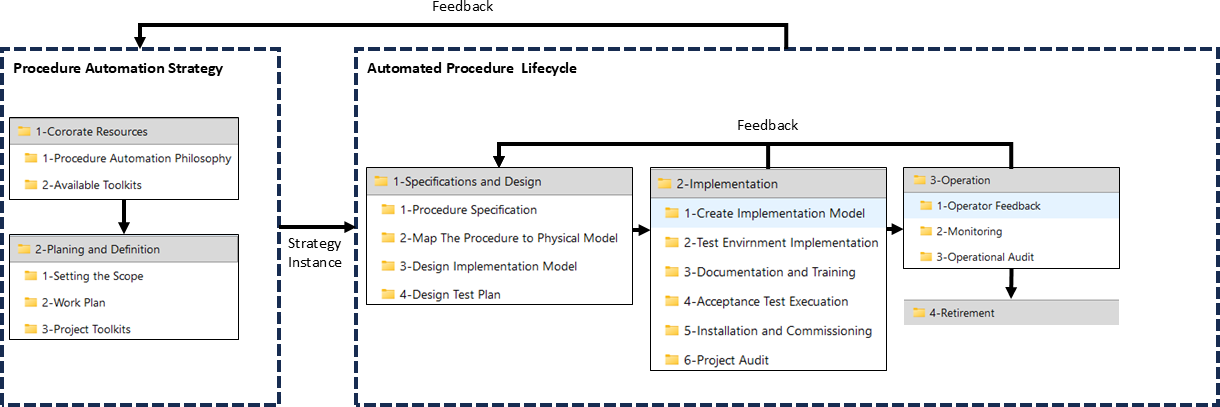
Figure 36 presents the Procedure Automation Lifecycle Management Strategy
the Procedure Automation Lifecycle Management Strategy which outlines the systematic approach for managing automated control procedures from initial development through decommissioning. This lifecycle management framework ensures that automated procedures maintain their effectiveness, safety, and compliance throughout their operational life.
The strategy encompasses several key phases that control engineers must navigate. During the design phase, engineers establish the control logic and define the procedure’s functional requirements. The implementation phase involves translating these requirements into executable code and configuring the control system hardware.
Note: Lifecycle management differs from simple project management in that it continues well beyond system commissioning and focuses on long-term operational performance.
The operational phase requires ongoing monitoring and performance assessment to ensure the automated procedures continue meeting their original design objectives. This includes regular validation of control parameters, safety interlocks, and alarm functions. Maintenance activities during this phase involve both preventive measures (scheduled updates and calibrations) and corrective actions (troubleshooting and repairs).
Industrial Example: A temperature control loop in a chemical reactor requires periodic tuning of PID parameters as process conditions change, documentation updates when safety procedures are modified, and eventual replacement when newer control technology becomes available.
The final phase addresses procedure retirement or modification when systems reach end-of-life or when process requirements change significantly. This includes proper documentation of lessons learned and knowledge transfer to support future procedure development efforts.
The Procedure Automation Strategy, shown as the left-hand dashed rectangle in Figure 36, operates at a high organizational level—whether that’s company-wide, business unit-wide, or across multiple programs and projects. This strategy is developed and maintained on its own schedule, separate from any individual project or operational implementation you might be working on.
Key Point: Think of this strategy as the master plan that exists above and beyond your current automation project. While you’re focused on implementing a specific control system, this broader strategy provides the foundation and guidelines for how automation should be approached across the entire organization.
The Strategy’s main deliverable is a comprehensive framework that serves as the starting point for every Procedure Automation Lifecycle instance (each individual automation project or implementation). This framework should include the following components:
Note: As a control engineer, you’ll typically receive this framework at the beginning of your project rather than creating it yourself. However, understanding its purpose helps you see how your specific automation work fits into the bigger picture and ensures your implementation aligns with organizational standards and goals.
- Setting the Scope: Identification of the intended breadth of impact, whether it is a large-scale project affecting multiple sites, or a small equipment upgrade affecting a single piece of equipment.
- Work Plan: Documented workflows for implementation and maintenance of each lifecycle instance implemented using this strategy.
- Toolkits: Collection of development and documentation tools and templates, including code and HMI object libraries, available for use in implementing each Procedure Automation Lifecycle instance.
The Procedure Automation Lifecycle is shown in Figure 36 as a dashed rectangle representing the work processes involved in automating procedures for a project. A lifecycle instance (a single execution of the complete automation process) may be part of any size project, from a large capital project to a small operating project.
Definition: The lifecycle encompasses all phases from initial procedure identification through implementation and maintenance of the automated control sequences.
Industrial Example: A large capital project might involve automating startup sequences for an entire new production unit, while a small operating project could focus on automating a single equipment shutdown procedure in an existing facility.
Example 1 A lifecycle instance (a complete project cycle from planning to commissioning) involving large teams of people and requiring the automation of hundreds or thousands of procedures. This typically occurs during the construction of a large integrated petrochemical site or when executed alongside a major control system upgrade, replacement, or migration.
Industrial Example: Think of building a new refinery where multiple DCS systems (Distributed Control Systems - the main automation platforms) need to be integrated, or upgrading an entire plant from legacy pneumatic controls to modern digital systems. These projects involve coordinating process engineers, instrument technicians, system integrators, and operations personnel across multiple phases.
Note: The scale here means you’re not just dealing with individual control loops, but entire process units with interconnected safety systems, regulatory controls, and production optimization strategies all running simultaneously.
A lifecycle instance that involves automating a single procedure on one specific piece of process equipment, with the automation being implemented and managed by one person.
Definition: A lifecycle instance refers to the complete sequence of phases that an automation project goes through, from initial planning and design to implementation, operation, and eventual decommissioning.
Industrial Example: This could be a single control engineer developing and implementing PID control for temperature regulation on one heat exchanger, handling everything from loop tuning to HMI configuration.
When an item is added to the Physical Model (the mathematical representation of your actual plant or process), the control system must account for this new component in its calculations. This addition affects the overall system dynamics and may require updates to controller parameters, state estimators, or feedback loops to maintain proper system performance.
Note: Adding items to the Physical Model is common during system commissioning or when plant equipment is modified or expanded.
A Procedure Automation Lifecycle starts when you begin a new project or make significant changes to any of the three core models: the Physical Model (which represents the actual equipment and instrumentation), the Procedure Specification Model (which defines what the automated procedure should accomplish), or the Procedure Implementation Model (which contains the actual control logic and code). This lifecycle establishes the structured workflows you need to follow for implementing, testing, and maintaining your automation procedure from initial development through eventual decommissioning.
Note: Think of this lifecycle as your roadmap for managing an automated procedure - it ensures you follow consistent steps whether you’re building a new batch control sequence or modifying an existing interlock system.
The Procedure Automation Lifecycle represents a specific implementation of the current Procedure Automation Strategy framework, which is built upon established procedure automation principles and available toolsets.
Definition: The lifecycle refers to the complete sequence of phases from initial automation design through commissioning and operation.
When project-specific requirements require deviating from the standard framework (such as unique process constraints or equipment limitations), these deviations must be documented as exceptions. This documentation serves two purposes: it provides a review trail for the current project and helps identify potential improvements to the overall strategy for future implementations.
Note: Each Procedure Automation Lifecycle may use slightly different versions of the Procedure Automation Strategy, and these strategies can be updated during project execution as requirements evolve or issues are discovered. These variations are handled according to each project’s change management procedures and the organization’s configuration control standards.
Industrial Example: If a batch reactor control system requires a non-standard interlock sequence due to equipment-specific safety requirements, this deviation would be documented as an exception while still following the overall automation lifecycle framework.
Figure 37 illustrates how each lifecycle instance (individual project phase or development stage) receives its own snapshot of the procedure automation strategy and shows how this relates to the V-model development framework.
Note: The V-model is a systems development methodology commonly used in automation projects where verification and validation activities run parallel to each development phase, forming a “V” shape when mapped out visually.
Definition: A lifecycle instance represents a specific stage in the automation system’s development, such as requirements gathering, design, implementation, or testing phases.
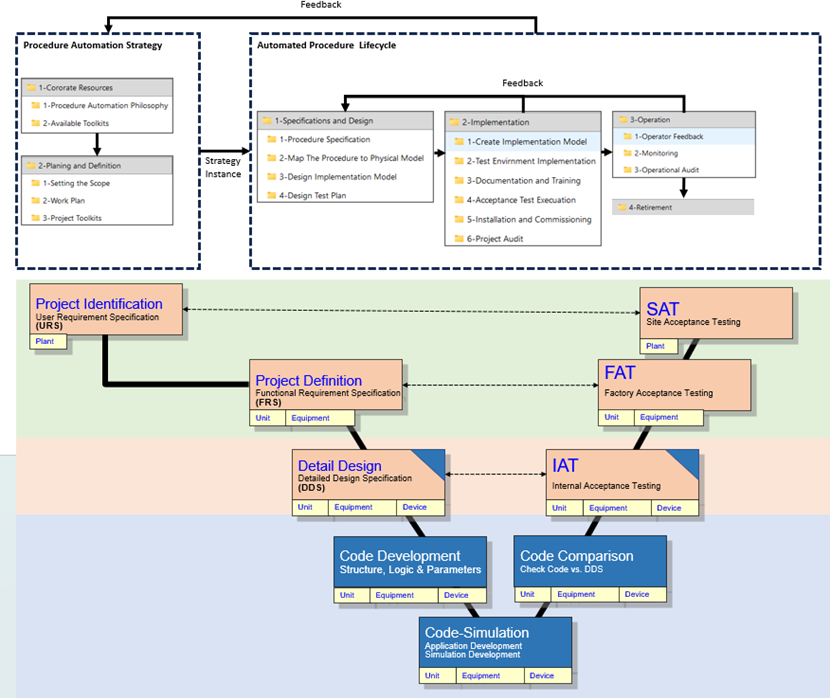
Figure 37 – Procedure Automation Strategy Snapshot for each Lifecycle Instance
This figure provides a comprehensive view of how automation strategies are applied across different lifecycle instances (the various phases a process or system goes through from startup to shutdown). Each snapshot captures the specific automation approach, control logic, and procedural steps that are active during a particular operational phase.
Note: Lifecycle instances represent distinct operational states such as startup sequences, normal operation, maintenance modes, emergency shutdowns, or batch processing phases. Each instance requires its own tailored automation strategy to ensure safe and efficient operation.
The snapshot format allows control engineers to quickly assess which automated procedures are running, what control parameters are active, and how the system behavior changes between different operational phases. This is particularly valuable for troubleshooting, system optimization, and ensuring consistent performance across all lifecycle stages.
Industrial Example: In a chemical reactor system, you might have separate automation strategies for heating ramp-up, reaction control, cooling sequences, and cleaning cycles - each with different setpoints, control algorithms, and safety interlocks appropriate for that specific phase.
The lifecycle instance portion of the Procedure Automation Strategy shown in Figure 37 contains four major groups of work processes:
Definition: A lifecycle instance refers to a specific implementation or execution of an automated procedure from initiation through completion, encompassing all the operational phases that the procedure undergoes during its active runtime.
These four major work process groups represent the core operational activities that must be managed and coordinated throughout the automated procedure’s execution. Each group handles distinct aspects of the procedure’s operation, from initial setup and configuration through monitoring, control actions, and eventual completion or termination.
Note: Understanding these work process groups is essential for control engineers as they define how automated procedures interact with plant equipment, operator interfaces, and safety systems during actual operations.
- Specifications and Design (FRS and DDS)
- Implementation (Code and Verification IAT, SAT, and SAT)
- Operation
- Retirement
These work processes are detailed in chapters 7 through 11 of this standard. Many organizations already have established work processes that complement those outlined in this standard (such as existing maintenance procedures, safety protocols, or documentation workflows). When this occurs, the automated procedure work processes recommended by this standard should be seamlessly integrated with your current work processes rather than replacing them entirely.
Note: This integration approach helps maintain operational continuity while implementing the standardized automated procedures. Consider mapping your existing processes against the standard’s requirements to identify overlap and gaps before implementation.
Many of the work processes and activities in this standard are described as happening one after another (serial execution); this approach is used to make the documentation clearer and easier to follow. However, organizations can choose to run some of these work processes and activities at the same time (parallel execution) to reduce the overall time needed to complete automation projects.
Note: Serial execution means completing one task before starting the next, while parallel execution allows multiple tasks to run simultaneously. In practice, experienced project teams often overlap activities like hardware specification and software development to accelerate project timelines, as long as dependencies between tasks are properly managed.
Choosing the right team members for each phase of the automation lifecycle directly impacts project success. The participant group should include representatives from all stakeholder areas that will be affected by or interact with the automated procedures.
Critical Success Factor: Getting operations personnel involved early and keeping them engaged throughout the project is essential. These are the people who run the plant day-to-day and understand the practical realities of the process better than anyone else.
Beyond the core engineering and operations teams, consider including specialized groups like Health-Safety-Environment (HSE) and Maintenance departments. HSE brings critical safety requirements and regulatory knowledge, while Maintenance provides insights into equipment reliability and serviceability concerns that could affect procedure design.
Note: Each stakeholder group contributes unique knowledge - operations knows what actually works on the floor, HSE ensures safety compliance, and maintenance understands long-term equipment behavior. Missing any of these perspectives early in the project often leads to costly redesigns later.
6.5 Requirement
The Procedure Owner shall incorporate a Lifecycle Management Strategy into its operating organization’s methodology.
Definition: A Procedure Owner is typically the department or individual responsible for maintaining and executing specific operational procedures within the facility.
Note: This integration ensures that maintenance schedules, performance monitoring, upgrade planning, and eventual replacement decisions are built into routine operations rather than handled reactively. For control systems, this means planning for software updates, hardware obsolescence, and calibration cycles as part of normal plant operations.
6.6 Requirement
The Procedure Owner shall implement an iterative review process (continuous improvement).
Where we continuously monitor system performance, identify deviations from desired setpoints, and make adjustments to improve overall operation.
Note: In practice, this means scheduling periodic reviews of your control documentation, gathering feedback from operators and maintenance teams, and updating procedures based on lessons learned from system performance or process changes. The goal is to create a closed-loop improvement cycle that enhances both safety and operational efficiency over time.